
ADSL Proxy API Application and Usage
This document mainly introduces the usage process of the ADSL Proxy API, which allows us to easily extract ADSL IPs and add IPs to the ADSL Proxy whitelist.
¶ Application Process
To use the extraction of ADSL IPs and add IPs to the ADSL Proxy whitelist, you can first go to the ADSL Proxy Extract API and ADSL Proxy Whitelist API pages and click the "Acquire" button to obtain the credentials needed for the request:

If you are not logged in or registered, you will be automatically redirected to the login page inviting you to register and log in. After logging in or registering, you will be automatically returned to the current page.
There is a free quota available for first-time applicants, allowing you to use the API for free.
¶ Extracting ADSL IPs
Next, you can fill in the corresponding content on the ADSL Proxy Extract API interface. Below is a demonstration of how to extract ADSL IPs.
¶ Setting Request Headers and Request Body
Request Headers include:
accept: Specifies that the response result should be in JSON format, set toapplication/json.authorization: The key for calling the API, which can be selected directly after application.
Request Body includes:
number: The number of ADSL IPs to extract, default is 1.type: The type of ADSL IP to extract, mainly divided intohttpandsocks, default ishttp.province: The province where the IP is extracted from, default is random.city: The city where the IP is extracted from, default is random.
For the parameters province and city, there are requirements; they must correspond to each other. For example, city: Nanchang must correspond to province: Jiangxi, and they need to match the province. The specific rules are as follows:
{"province":"Beijing","city":"Beijing","pId":0,"cId":0},{"province":"Tianjin","city":"Tianjin","pId":1,"cId":1},{"province":"Shanghai","city":"Shanghai","pId":2,"cId":3},{"province":"Chongqing","city":"Chongqing","pId":3,"cId":4},{"province":"Heilongjiang","city":"Daxing'anling Prefecture","pId":4,"cId":7},{"province":"Heilongjiang","city":"Heihe","pId":4,"cId":8},{"province":"Heilongjiang","city":"Qiqihar","pId":4,"cId":9},{"province":"Heilongjiang","city":"Suihua","pId":4,"cId":10},{"province":"Heilongjiang","city":"Hegang","pId":4,"cId":11},{"province":"Heilongjiang","city":"Jiamusi","pId":4,"cId":12},{"province":"Heilongjiang","city":"Yichun","pId":4,"cId":13},{"province":"Heilongjiang","city":"Shuangyashan","pId":4,"cId":14},{"province":"Heilongjiang","city":"Harbin","pId":4,"cId":15},{"province":"Heilongjiang","city":"Jixi","pId":4,"cId":16},{"province":"Heilongjiang","city":"Daqing","pId":4,"cId":18},{"province":"Heilongjiang","city":"Qitaihe","pId":4,"cId":19},{"province":"Heilongjiang","city":"Mudanjiang","pId":4,"cId":20},{"province":"Jilin","city":"Liaoyuan","pId":5,"cId":22},{"province":"Jilin","city":"Tonghua","pId":5,"cId":23},{"province":"Jilin","city":"Baicheng","pId":5,"cId":24},{"province":"Jilin","city":"Songyuan","pId":5,"cId":25},{"province":"Jilin","city":"Changchun","pId":5,"cId":26},{"province":"Jilin","city":"Jilin City","pId":5,"cId":27},{"province":"Jilin","city":"Yanbian Korean Autonomous Prefecture","pId":5,"cId":29},{"province":"Jilin","city":"Baishan","pId":5,"cId":31},{"province":"Jilin","city":"Siping","pId":5,"cId":32},{"province":"Liaoning","city":"Huludao","pId":6,"cId":33},{"province":"Liaoning","city":"Panjin","pId":6,"cId":34},{"province":"Liaoning","city":"Liaoyang","pId":6,"cId":35},{"province":"Liaoning","city":"Tieling","pId":6,"cId":36},{"province":"Liaoning","city":"Fuxin","pId":6,"cId":37},{"province":"Liaoning","city":"Chaoyang","pId":6,"cId":38},{"province":"Liaoning","city":"Jinzhou","pId":6,"cId":39},{"province":"Liaoning","city":"Anshan","pId":6,"cId":40},{"province":"Liaoning","city":"Shenyang","pId":6,"cId":41},{"province":"Liaoning","city":"Benxi","pId":6,"cId":42},{"province":"Liaoning","city":"Fushun","pId":6,"cId":43},{"province":"Liaoning","city":"Yingkou","pId":6,"cId":44},{"province":"Liaoning","city":"Dandong","pId":6,"cId":45},{"province":"Liaoning","city":"Dalian","pId":6,"cId":47},{"province":"Inner Mongolia","city":"Hulunbuir","pId":7,"cId":48},{"province":"Inner Mongolia","city":"Xing'an League","pId":7,"cId":49},{"province":"Inner Mongolia","city":"Xilin Gol League","pId":7,"cId":50},{"province":"Inner Mongolia","city":"Bayannur","pId":7,"cId":51},{"province":"Inner Mongolia","city":"Baotou","pId":7,"cId":52},{"province":"Inner Mongolia","city":"Hohhot","pId":7,"cId":53},{"province":"Inner Mongolia","city":"Tongliao","pId":7,"cId":55},{"province":"Inner Mongolia","city":"Chifeng","pId":7,"cId":56},{"province":"Inner Mongolia","city":"Wuhai","pId":7,"cId":57},{"province":"Inner Mongolia","city":"Ordos","pId":7,"cId":58},{"province":"Inner Mongolia","city":"Ulanqab","pId":7,"cId":59},{"province":"Ningxia","city":"Shizuishan","pId":8,"cId":60},{"province":"Ningxia","city":"Yinchuan","pId":8,"cId":61},{"province":"Ningxia","city":"Wuzhong","pId":8,"cId":62},{"province":"Ningxia","city":"Guyuan","pId":8,"cId":63},{"province":"Gansu","city":"Zhangye","pId":9,"cId":64},{"province":"Gansu","city":"Jinchang","pId":9,"cId":65},{"province":"Gansu","city":"Wuwei","pId":9,"cId":66},{"province":"Gansu","city":"Lanzhou","pId":9,"cId":67},{"province":"Gansu","city":"Baiyin","pId":9,"cId":68},{"province":"Gansu","city":"Dingxi","pId":9,"cId":69},{"province":"Gansu","city":"Pingliang","pId":9,"cId":70},{"province":"Gansu","city":"Qingyang","pId":9,"cId":71},{"province":"Gansu","city":"Gannan Tibetan Autonomous Prefecture","pId":9,"cId":72},{"province":"Gansu","city":"Linxia Hui Autonomous Prefecture","pId":9,"cId":73},{"province":"Gansu","city":"Tianshui","pId":9,"cId":74},{"province":"Gansu","city":"Jiayuguan","pId":9,"cId":75},{"province":"Gansu","city":"Jiuquan","pId":9,"cId":76},{"province":"Gansu","city":"Longnan","pId":9,"cId":77},{"province":"Xinjiang","city":"Changji Hui Autonomous Prefecture","pId":10,"cId":78},{"province":"Xinjiang","city":"Kizilsu Kirghiz Autonomous Prefecture","pId":10,"cId":79},{"province":"Xinjiang","city":"Ili Kazakh Autonomous Prefecture","pId":10,"cId":80},{"province":"Xinjiang","city":"Alar","pId":10,"cId":81},{"province":"Xinjiang","city":"Karamay","pId":10,"cId":82},{"province":"Xinjiang","city":"Bortala Mongol Autonomous Prefecture","pId":10,"cId":83},{"province":"Xinjiang","city":"Urumqi","pId":10,"cId":84},{"province":"Xinjiang","city":"Turpan","pId":10,"cId":85},{"province":"Xinjiang","city":"Aksu Prefecture","pId":10,"cId":86},{"province":"Xinjiang","city":"Shihezi","pId":10,"cId":87},{"province":"Xinjiang","city":"Kashgar Prefecture","pId":10,"cId":88},{"province":"Xinjiang","city":"Hotan Prefecture","pId":10,"cId":89},{"province":"Xinjiang","city":"Hami","pId":10,"cId":90},{"province":"Shaanxi","city":"Yulin","pId":11,"cId":92},{"province":"Shaanxi","city":"Yan'an","pId":11,"cId":93},{"province":"Shaanxi","city":"Xianyang","pId":11,"cId":94},{"province":"Shaanxi","city":"Xi'an","pId":11,"cId":95},{"province":"Shaanxi","city":"Weinan","pId":11,"cId":96},{"province":"Shaanxi","city":"Hanzhong","pId":11,"cId":97},{"province":"Shaanxi","city":"Shangluo","pId":11,"cId":98},{"province":"Shaanxi","city":"Ankang","pId":11,"cId":99},{"province":"Shaanxi","city":"Tongchuan","pId":11,"cId":100},{"province":"Shaanxi","city":"Baoji","pId":11,"cId":101},{"province":"Shanxi","city":"Changzhi","pId":12,"cId":102},{"province":"Shanxi","city":"Jinzhong","pId":12,"cId":103},{"province":"Shanxi","city":"Shuozhou","pId":12,"cId":104},{"province":"Shanxi","city":"Datong","pId":12,"cId":105},{"province":"Shanxi","city":"Lüliang","pId":12,"cId":106},{"province":"Shanxi","city":"Xinzhou","pId":12,"cId":107},{"province":"Shanxi","city":"Taiyuan","pId":12,"cId":108},{"province":"Shanxi","city":"Yangquan","pId":12,"cId":109},{"province":"Shanxi","city":"Linfen","pId":12,"cId":110},{"province":"Shanxi","city":"Yuncheng","pId":12,"cId":111},{"province":"Shanxi","city":"Jincheng","pId":12,"cId":112},{"province":"Shandong","city":"Dezhou","pId":13,"cId":114},{"province":"Shandong","city":"Binzhou","pId":13,"cId":115},{"province":"Shandong","city":"Yantai","pId":13,"cId":116},{"province":"Shandong","city":"Liaocheng","pId":13,"cId":117},{"province":"Shandong","city":"Jinan","pId":13,"cId":118},{"province":"Shandong","city":"Tai'an","pId":13,"cId":119},{"province":"Shandong","city":"Zibo","pId":13,"cId":120},{"province":"Shandong","city":"Weifang","pId":13,"cId":121},{"province":"Shandong","city":"Qingdao","pId":13,"cId":122},{"province":"Shandong","city":"Jining","pId":13,"cId":123},{"province":"Shandong","city":"Rizhao","pId":13,"cId":124},{"province":"Shandong","city":"Zaozhuang","pId":13,"cId":126},{"province":"Shandong","city":"Dongying","pId":13,"cId":127},{"province":"Shandong","city":"Weihai","pId":13,"cId":128},{"province":"Shandong","city":"Laiwu","pId":13,"cId":129},{"province":"Shandong","city":"Linyi","pId":13,"cId":130},{"province":"Shandong","city":"Heze","pId":13,"cId":131},{"province":"Hebei","city":"Handan","pId":14,"cId":132},{"province":"Hebei","city":"Hengshui","pId":14,"cId":133},{"province":"Hebei","city":"Shijiazhuang","pId":14,"cId":134},{"province":"Hebei","city":"Xingtai","pId":14,"cId":135},{"province":"Hebei","city":"Zhangjiakou","pId":14,"cId":136},{"province":"Hebei","city":"Chengde","pId":14,"cId":137},{"province":"Hebei","city":"Qinhuangdao","pId":14,"cId":138},{"province":"Hebei","city":"Langfang","pId":14,"cId":139},{"province":"Hebei","city":"Tangshan","pId":14,"cId":140},{"province":"Hebei","city":"Baoding","pId":14,"cId":141},{"province":"Hebei","city":"Cangzhou","pId":14,"cId":142},{"province":"Henan","city":"Anyang","pId":15,"cId":143},{"province":"Henan","city":"Sanmenxia","pId":15,"cId":144},{"province":"Henan","city":"Zhengzhou","pId":15,"cId":145},{"province":"Henan","city":"Nanyang","pId":15,"cId":146},{"province":"Henan","city":"Zhoukou","pId":15,"cId":147},{"province":"Henan","city":"Zhumadian","pId":15,"cId":148},{"province":"Henan","city":"Xinyang","pId":15,"cId":149},{"province":"Henan","city":"Kaifeng","pId":15,"cId":150},{"province":"Henan","city":"Luoyang","pId":15,"cId":151},{"province":"Henan","city":"Pingdingshan","pId":15,"cId":152},{"province":"Henan","city":"Jiaozuo","pId":15,"cId":153},{"province":"Henan","city":"Hebi","pId":15,"cId":154},{"province":"Henan","city":"Xinxiang","pId":15,"cId":155},{"province":"Henan","city":"Puyang","pId":15,"cId":156},{"province":"Henan","city":"Xuchang","pId":15,"cId":157},{"province":"Henan","city":"Luohe","pId":15,"cId":158},{"province":"Henan","city":"Shangqiu","pId":15,"cId":159},{"province":"Henan","city":"Jiyuan","pId":15,"cId":160},{"province":"Tibet","city":"Naqu","pId":16,"cId":161},{"province":"Tibet","city":"Shigatse","pId":16,"cId":162},{"province":"Tibet","city":"Lhasa","pId":16,"cId":163},{"province":"Tibet","city":"Shannan","pId":16,"cId":164},{"province":"Tibet","city":"Ali Prefecture","pId":16,"cId":165},{"province":"Tibet","city":"Changdu","pId":16,"cId":166},{"province":"Tibet","city":"Nyingchi","pId":16,"cId":167},{"province":"Yunnan","city":"Zhaotong","pId":17,"cId":168},{"province":"Yunnan","city":"Lijiang","pId":17,"cId":169},{"province":"Yunnan","city":"Qujing","pId":17,"cId":170},{"province":"Yunnan","city":"Baoshan","pId":17,"cId":171},{"province":"Yunnan","city":"Dali Bai Autonomous Prefecture","pId":17,"cId":172},{"province":"Yunnan","city":"Chuxiong Yi Autonomous Prefecture","pId":17,"cId":173},{"province":"Yunnan","city":"Kunming","pId":17,"cId":174},{"province":"Yunnan","city":"Yuxi","pId":17,"cId":176},{"province":"Yunnan","city":"Lincang","pId":17,"cId":177},{"province":"Yunnan","city":"Pu'er","pId":17,"cId":178},{"province":"Yunnan","city":"Honghe Hani and Yi Autonomous Prefecture","pId":17,"cId":179},{"province":"Yunnan","city":"Wenshan Zhuang and Miao Autonomous Prefecture","pId":17,"cId":180},{"province":"Yunnan","city":"Xishuangbanna Dai Autonomous Prefecture","pId":17,"cId":181},{"province":"Yunnan","city":"Dehong Dai and Jingpo Autonomous Prefecture","pId":17,"cId":182},{"province":"Yunnan","city":"Nujiang Lisu Autonomous Prefecture","pId":17,"cId":183},{"province":"Yunnan","city":"Diqing Tibetan Autonomous Prefecture","pId":17,"cId":184},{"province":"Sichuan","city":"Ganzi Tibetan Autonomous Prefecture","pId":18,"cId":185},{"province":"Sichuan","city":"Aba Tibetan and Qiang Autonomous Prefecture","pId":18,"cId":186},{"province":"Sichuan","city":"Liangshan Yi Autonomous Prefecture","pId":18,"cId":187},{"province":"Sichuan","city":"Chengdu","pId":18,"cId":188},{"province":"Sichuan","city":"Mianyang","pId":18,"cId":189},{"province":"Sichuan","city":"Ya'an","pId":18,"cId":190},{"province":"Sichuan","city":"Leshan","pId":18,"cId":192},{"province":"Sichuan","city":"Yibin","pId":18,"cId":193},{"province":"Sichuan","city":"Bazhong","pId":18,"cId":194},{"province":"Sichuan","city":"Dazhou","pId":18,"cId":195},{"province":"Sichuan","city":"Suining","pId":18,"cId":196},{"province":"Sichuan","city":"Nanchong","pId":18,"cId":
Therefore, according to the above rules, we need to set the correct `province` and `city`, preferably selecting the Jiangsu and Zhejiang regions, as these areas have more IPs. The specific parameter settings are shown in the figure below:

<p><img src="https://cdn.acedata.cloud/g8remv.png" width="500" class="m-auto"></p>

### Code Example

It can be seen that various language codes have been automatically generated on the right side of the page, as shown in the figure:

<p><img src="https://cdn.acedata.cloud/e2rmr0.png" width="500" class="m-auto"></p>

Some code examples are as follows:

#### CURL

```bash
curl -X POST 'https://api.acedata.cloud/adsl/extract' \
-H 'accept: application/json' \
-H 'authorization: Bearer {token}' \
-H 'content-type: application/json' \
-d '{
  "province": "Zhejiang",
  "city": "Wenzhou"
}'
¶ Python
import requests

url = "https://api.acedata.cloud/adsl/extract"

headers = {
    "accept": "application/json",
    "authorization": "Bearer {token}",
    "content-type": "application/json"
}

payload = {
    "province": "Zhejiang",
    "city": "Wenzhou"
}

response = requests.post(url, json=payload, headers=headers)
print(response.text)
¶ Response Example
After a successful request, the API will return the result information of the face-swapping backend image. For example:
{
  "success": true,
  "data": [
    {
      "ip": "115.219.4.171",
      "port": 23456,
      "proxy": "115.219.4.171:23456",
      "outbound_ip": "115.219.4.171",
      "province": "Zhejiang",
      "city": "Wenzhou",
      "expire_at": 1721877364.588,
      "dialed_at": 1721876984.588
    }
  ],
  "trace_id": "406465b0-f086-4a12-87a7-cdf05a3930a1"
}
It can be seen that the result contains a data field, which includes the details of the IP extraction task here, and other information is shown in the figure below:
success, the result status of the ADSL IP extraction task here.data, detailed information of the extracted ADSL IP.
From data, we can clearly see the detailed information of this IP, where the main information ip indicates the IP address extracted this time, and other information is as follows:
ip, the IP address extracted from ADSL here.port, the port information of the ADSL IP extracted here.proxy, the complete information of the ADSL IP proxy after extraction.province, the province where the extracted ADSL IP is located.city, the city where the extracted ADSL IP is located.
It can be seen that we can easily use the above proxy for the next step of IP proxy work.
First, before using the IP proxy, we need to add our own network IP address (please find the method to obtain the local network IP by yourself) to the whitelist mentioned below. Next, let's talk about how to use the IP proxy:
¶ Using Proxy
Note: Before using the extracted proxy IP, please be sure to add the IP whitelist; otherwise, it cannot be used. For instructions on adding to the whitelist, please refer to the content below.
Curl example code:
curl -x 115.219.4.171:23456 myip.vpsnb.net # http proxy
curl --socks5 115.219.3.54:23457 myip.vpsnb.net # socks proxy
Python example proxy:
import requests
import socks
import socket
import time

def test_http_proxy(proxy):
    try:
        start_time = time.time()
        response = requests.get(
            'http://httpbin.org/ip', proxies={'http': proxy, 'https': proxy}, timeout=100)
        elapsed_time = time.time() - start_time
        print(response)
        if response.status_code == 200:
            print(f"HTTP Proxy {proxy} success. time: {elapsed_time:.2f} s")
            print(f"IP: {response.json()['origin']}")
        else:
            print(f"HTTP Proxy {proxy} failed. code: {response.status_code}")
    except Exception as e:
        print(f"HTTP Proxy {proxy} failed: {str(e)}")

def test_socks_proxy(proxy):
    proxy_parts = proxy.split(':')
    if len(proxy_parts) != 2:
        print(f"SOCKS failed: {proxy}")
        return

    host, port = proxy_parts
    port = int(port)

    try:
        start_time = time.time()
        socks.set_default_proxy(socks.SOCKS5, host, port)
        socket.socket = socks.socksocket
        response = requests.get('http://httpbin.org/ip', timeout=10)
        elapsed_time = time.time() - start_time

        if response.status_code == 200:
            print(f"SOCKS Proxy {proxy} success. time: {elapsed_time:.2f} s")
            print(f"IP: {response.json()['origin']}")
        else:
            print(f"SOCKS Proxy {proxy} failed. code: {response.status_code}")
    except Exception as e:
        print(f"SOCKS Proxy {proxy} failed: {str(e)}")
    finally:
        socks.set_default_proxy()
        socket.socket = socket.socket

if __name__ == "__main__":
    # HTTP Proxy
    http_proxy = "http://115.219.4.171:23456"
    test_http_proxy(http_proxy)

    # SOCKS Proxy
    socks_proxy = "115.219.3.54:23457"
    test_socks_proxy(socks_proxy)
¶ Response Example
{
  "ip": "115.219.4.171",
  "country": "China",
  "area": "0",
  "province": "Zhejiang Province",
  "city": "Wenzhou City",
  "isp": "Telecom",
  "timestamp": 1721877261
}
From the above result, it can be seen that the obtained result is consistent with the regional information at the time of extraction, indicating that the ADSL IP proxy is successful and valid.
¶ ADSL Proxy Type type
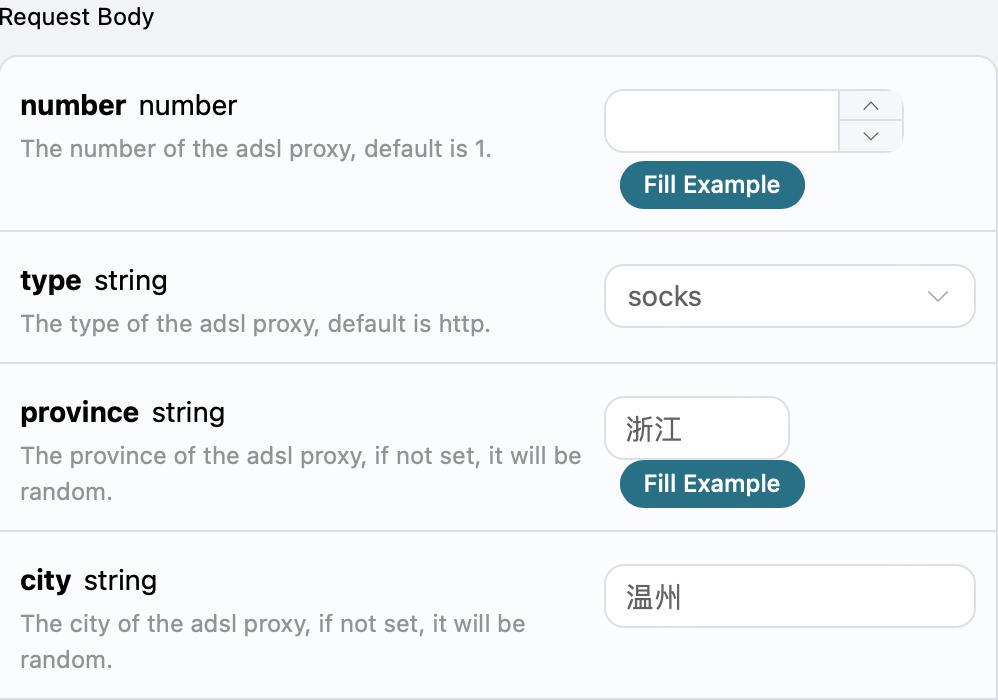
We can also set the type of ADSL IP proxy, which is mainly divided into two types: the first is http, and the other is socks, as the first one is the default. Next, we will take the second type as an example, and we can make the following settings.
The following sets the IP proxy type to socks, and the specific settings are shown in the figure below:
At the same time, you can notice that there is corresponding code generation on the right side, which you can copy and run directly, or you can click the "Try" button to test.
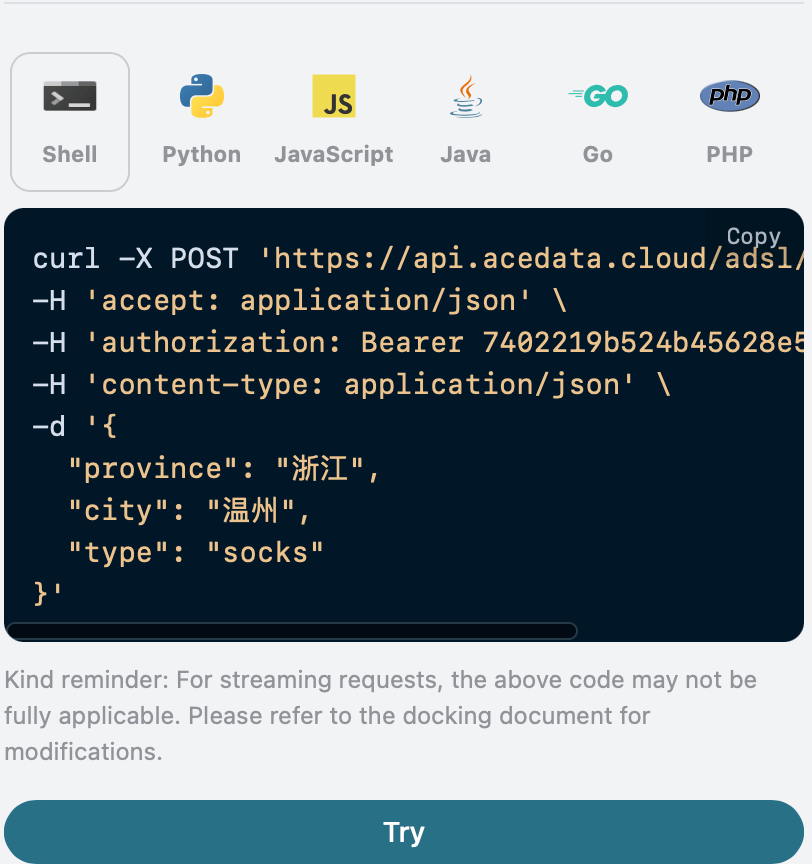
Python sample call code:
import requests

url = "https://api.acedata.cloud/adsl/extract"

headers = {
    "accept": "application/json",
    "authorization": "Bearer {token}",
    "content-type": "application/json"
}

payload = {
    "province": "Zhejiang",
    "city": "Wenzhou",
    "type": "socks"
}

response = requests.post(url, json=payload, headers=headers)
print(response.text)
After the call, we find that the returned result is as follows:
{
  "success": true,
  "data": [
    {
      "ip": "115.222.155.148",
      "port": 23457,
      "proxy": "115.222.155.148:23457",
      "outbound_ip": "115.222.155.148",
      "province": "Zhejiang",
      "city": "Wenzhou",
      "expire_at": 1721808226.561,
      "dialed_at": 1721807846.561
    }
  ],
  "trace_id": "27d06ff5-20e9-4476-bdda-9e72a54ac0d4"
}
The returned result is consistent with the previous content. It can be seen that the extracted ADSL IP proxy type is socks, so in the subsequent work, it is necessary to use the IP proxy service according to the type of proxy.
¶ Add IP Whitelist
Next, you can fill in the corresponding content on the interface, as shown in the figure:
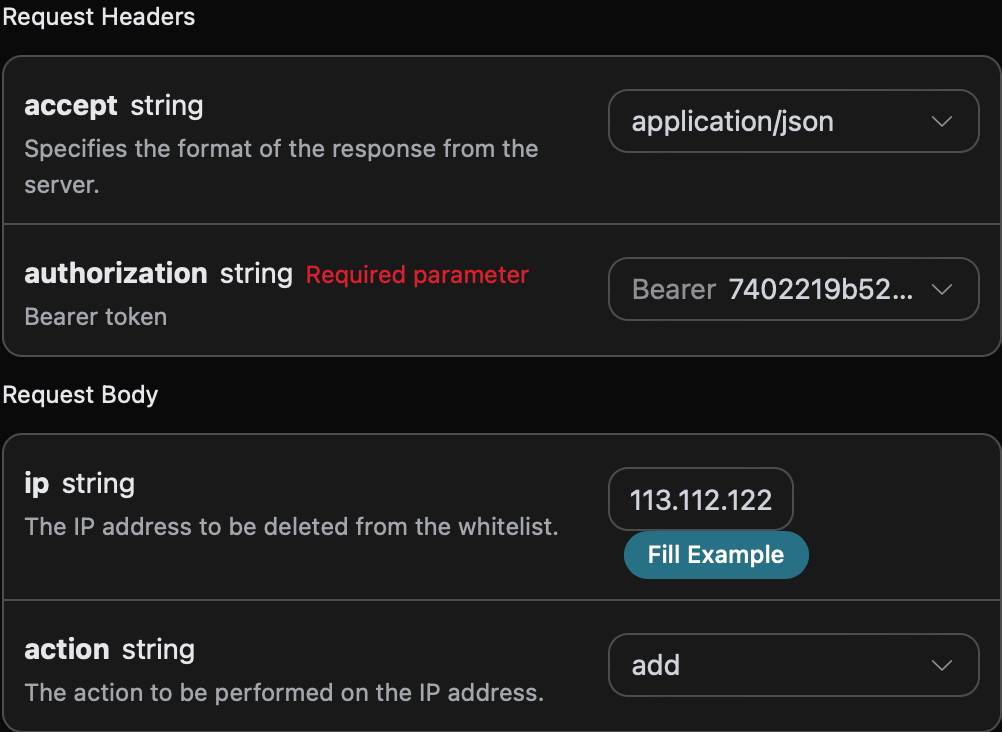
When using this interface for the first time, we need to fill in at least three pieces of information: one is authorization, which can be selected directly from the dropdown list. The other parameter is ip, which is the local network address of the IP proxy extracted from the previous text. The last parameter is action, which is the operation we are performing on the whitelist; here, it is the operation of adding to the whitelist.
At the same time, you can notice that there is corresponding code generation on the right side. You can copy the code to run directly or click the "Try" button for testing.
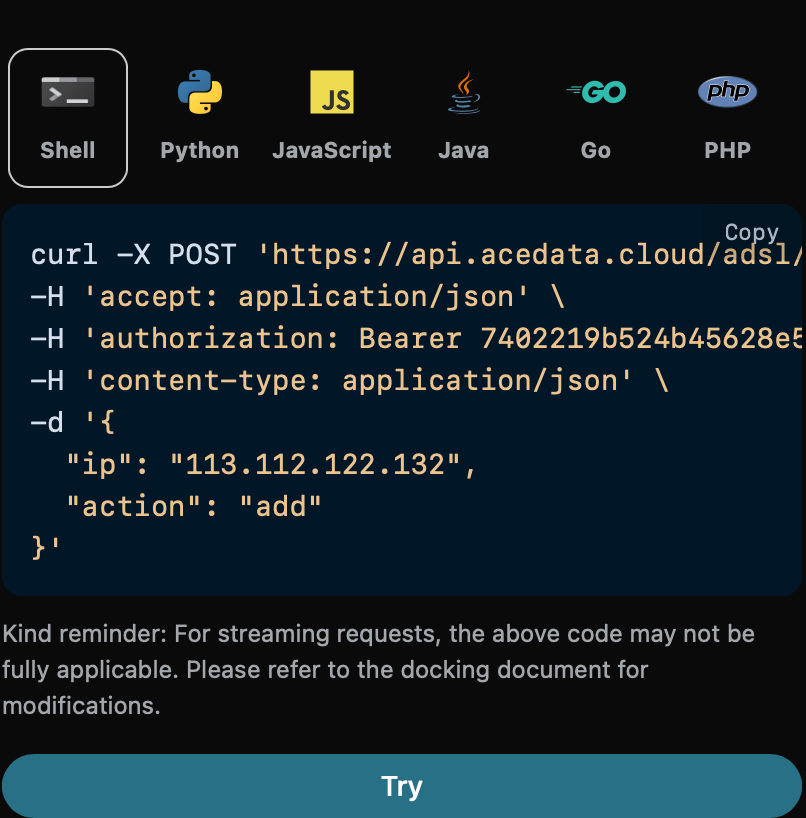
Python sample call code:
import requests

url = "https://api.acedata.cloud/adsl/whitelist"

headers = {
    "accept": "application/json",
    "authorization": "Bearer {token}",
    "content-type": "application/json"
}

payload = {
    "ip": "113.112.122.132",
    "action": "add"
}

response = requests.post(url, json=payload, headers=headers)
print(response.text)
After the call, we find that the returned result is as follows:
{
  "success": true
}
The returned result has one field, described as follows:
success, the status of the operation result here.
Where success contains the status of the operation result, we can see that the IP 113.112.122.132 has been successfully added to the whitelist.
¶ Error Handling
When calling the API, if an error occurs, the API will return the corresponding error code and message. For example:
400 token_mismatched: Bad request, possibly due to missing or invalid parameters.400 api_not_implemented: Bad request, possibly due to missing or invalid parameters.401 invalid_token: Unauthorized, invalid or missing authorization token.429 too_many_requests: Too many requests, you have exceeded the rate limit.500 api_error: Internal server error, something went wrong on the server.
¶ Error Response Example
{
  "success": false,
  "error": {
    "code": "api_error",
    "message": "fetch failed"
  },
  "trace_id": "2cf86e86-22a4-46e1-ac2f-032c0f2a4e89"
}
¶ Conclusion
Through this document, you have learned how to easily extract ADSL IP using the ADSL Proxy API and add IP to the ADSL Proxy whitelist. We hope this document can help you better integrate and use this API. If you have any questions, please feel free to contact our technical support team.