
Ace Data Cloud Platform Remaining Quota Inquiry
Since most APIs of the Ace Data Cloud platform are charged based on quotas, after integrating the API, in order to prevent sudden exhaustion of API quotas that may cause business interruptions or losses to your platform, the Ace Data Cloud platform has opened an interface for querying the remaining quota. Through this interface, your platform can recharge in a timely manner when it detects insufficient quota, ensuring business continuity.
This document will introduce how to integrate the interface for querying the remaining quota.
¶ View Application ID
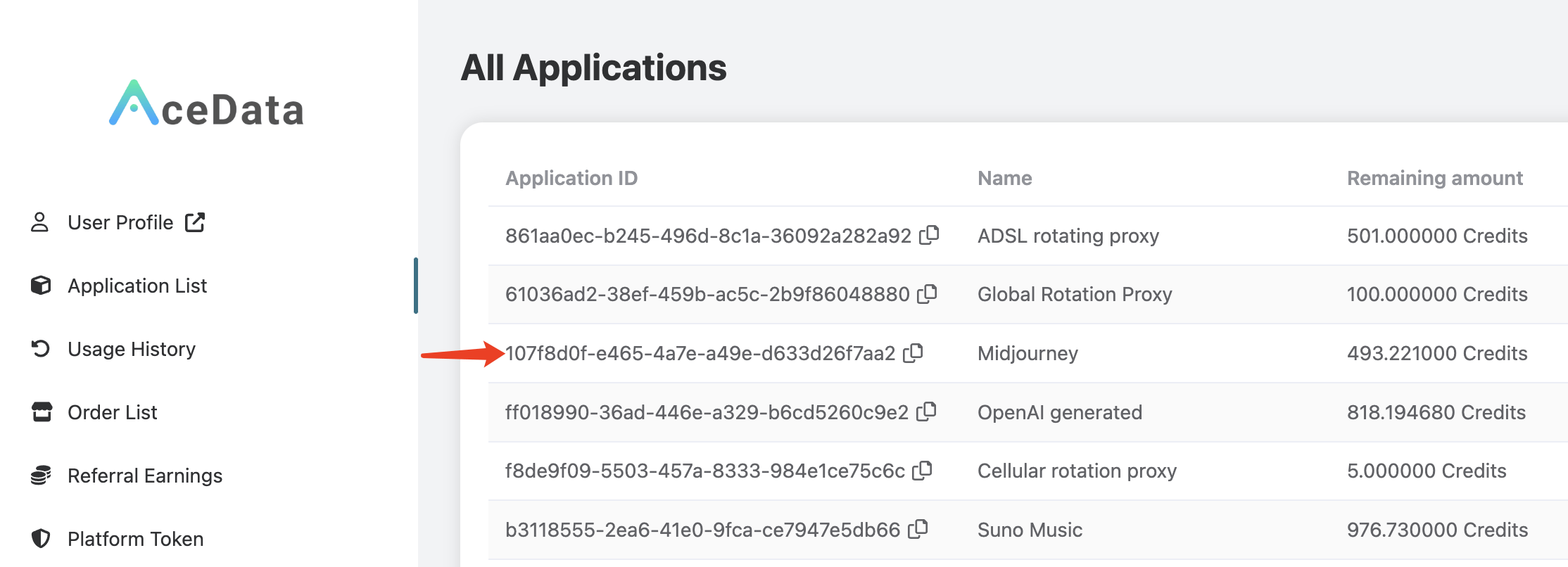
First, it is necessary to understand that each API service of the Ace Data Cloud platform corresponds to an "application" instance. Each "application" instance has its own ID, key, remaining quota, and other information, which you can view in your application list at https://platform.acedata.cloud/console/applications.
Next, if you want to query the remaining quota of a specific application, you need to copy the corresponding application ID.
For example, suppose you want to check the remaining quota of the "Midjourney API," you can copy that ID and record it as application_id.
¶ Create Account Token
The Ace Data Cloud platform provides an "account token" (previously called "platform token") mechanism, which facilitates developers to query Ace Data Cloud account information through the API, such as order lists, application lists, distribution information, call records, etc. This naturally includes the function of querying the remaining quota. The function of this token is similar to the user token after logging into the Ace Data Cloud platform, which allows you to view the application list, order list, call records, and other information based on it. However, unlike the user token, the validity period of the account token is permanent, while the user token will expire after a period of time (after expiration, you need to log in again).
Therefore, through the account token, you can easily obtain account information from the Ace Data Cloud platform.
First, you need to create an account token at https://platform.acedata.cloud/console/platform-tokens, as shown in the figure:

Copy the "account token" and record it as token.
¶ Quota Inquiry
With the above application_id and token, you can construct a URL to query the remaining quota. The API format for quota inquiry is as follows:
- Request Method: GET
- Request URL: https://platform.acedata.cloud/api/v1/applications/{application_id}
- Request Headers:
- accept:
application/json - authorization:
Bearer {token}
- accept:
The CURL request code is as follows:
curl -X GET \
  -H "accept: application/json" \
  -H "authorization: Bearer {token}" \
  "https://platform.acedata.cloud/api/v1/applications/{application_id}"
If token is platform-v1-5b8fbef60bc547098034db3e9f36a623731c490abe854f72972a0a3473b4c56b and application_id is 107f8d0f-e465-4a7e-a49e-d633d26f7aa2, then the command is as follows:
curl -X GET \
  -H "accept: application/json" \
  -H "authorization: Bearer platform-v1-5b8fbef60bc547098034db3e9f36a623731c490abe854f72972a0a3473b4c56b" \
  "https://platform.acedata.cloud/api/v1/applications/107f8d0f-e465-4a7e-a49e-d633d26f7aa2"
Please replace {application_id} with the actual application ID and {token} with a valid account token.
This CURL command will send a GET request to the specified URL and include the required accept and authorization information in the request headers.
The example result is as follows:
{
  "id": "107f8d0f-e465-4a7e-a49e-d633d26f7aa2",
  "service_id": "d87e5e99-b797-4ade-9e73-b896896b0461",
  "remaining_amount": 493.2210000000001,
  "used_amount": 21.778999999999996,
  "service": {
    ...
  },
  "user_id": "b87f67c1-b04f-4332-99a1-7a5e651331c6",
  "created_at": "2024-05-30T14:41:20.052849Z",
  "updated_at": "2024-08-16T07:51:15.603207Z",
  "tags": null,
  "expired_at": null,
  "type": "Usage",
  "metadata": null
}
Among them, the remaining_amount in the JSON result is the remaining quota.
For other programming languages, simply rewrite the CURL command into the corresponding language format. If you encounter difficulties in rewriting, you can use the tool at https://curlconverter.com/ to convert the CURL command into other languages.
For Python language:
import requests

url = "https://platform.acedata.cloud/api/v1/applications/{application_id}"
headers = {
    "accept": "application/json",
    "authorization": "Bearer {token}"
}

response = requests.get(url, headers=headers)
print(response.json())
For Node.js language:
import axios from "axios";

const url =
  "https://platform.acedata.cloud/api/v1/applications/{application_id}";
const headers = {
  accept: "application/json",
  authorization: "Bearer {token}",
};

axios
  .get(url, { headers })
  .then((response) => {
    console.log(response.data);
  })
  .catch((error) => {
    console.error(error);
  });
For Java language:
import okhttp3.OkHttpClient;
import okhttp3.Request;
import okhttp3.Response;

import java.io.IOException;

public class Main {
    public static void main(String[] args) {
        OkHttpClient client = new OkHttpClient();

        String url = "https://platform.acedata.cloud/api/v1/applications/{application_id}";
        String token = "{token}";

        Request request = new Request.Builder()
                .url(url)
                .addHeader("accept", "application/json")
                .addHeader("authorization", "Bearer " + token)
                .build();

        try {
            Response response = client.newCall(request).execute();
            String responseData = response.body().string();
            System.out.println(responseData);
        } catch (IOException e) {
            e.printStackTrace();
        }
    }
}
For PHP language:
<?php

$url = 'https://platform.acedata.cloud/api/v1/applications/{application_id}';
$token = '{token}';

$headers = array(
    'accept: application/json',
    'authorization: Bearer ' . $token
);

$ch = curl_init();
curl_setopt($ch, CURLOPT_URL, $url);
curl_setopt($ch, CURLOPT_HTTPHEADER, $headers);
curl_setopt($ch, CURLOPT_RETURNTRANSFER, true);

$response = curl_exec($ch);

curl_close($ch);

echo $response;
?>