
Kling Videos Generation API Integration Guide
This document introduces the Kling Videos Generation API integration guide, which allows generating official Kling videos by inputting custom parameters.
¶ Application Process
To use Kling Videos Generation API, first open the Ace Data Cloud Console and copy your API Token.
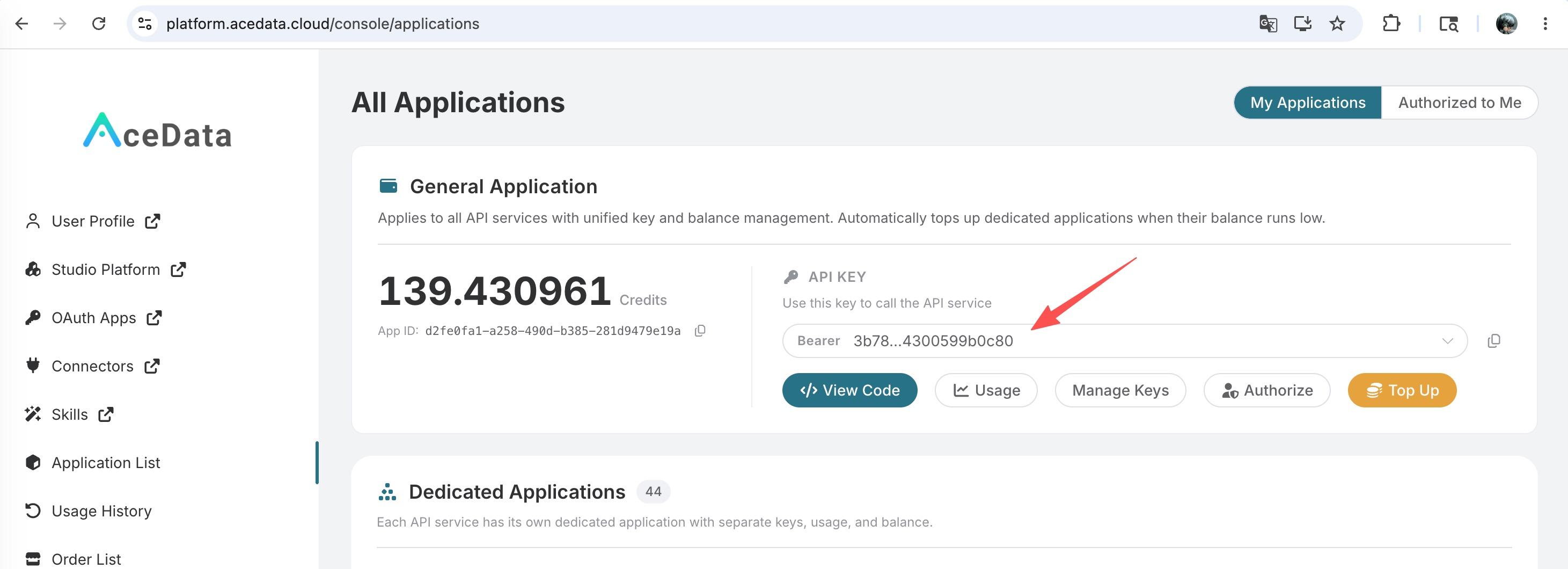
If you are not logged in, you will be redirected to sign in and brought back to this page automatically.
A single API Token works across every service on the platform — no need to subscribe per service. New accounts receive free starter credit; when it runs low you can top up your shared balance in the console.
📘 Full documentation: Kling Videos Generation API →
¶ Basic Usage
First, understand the basic usage: by inputting the prompt prompt, generation action action, first frame reference image start_image_url, and model model, you can get the processed result. You need to simply pass an action field with the value text2video. It mainly includes three actions: text-to-video (text2video), image-to-video (image2video), and extend video (extend). Then, you also need to input the model model. Currently, the main models are kling-v1, kling-v1-6, kling-v2-master, kling-v2-1-master, kling-v2-5-turbo, kling-v2-6, kling-v3, kling-v3-omni, and kling-video-o1. Details are as follows:
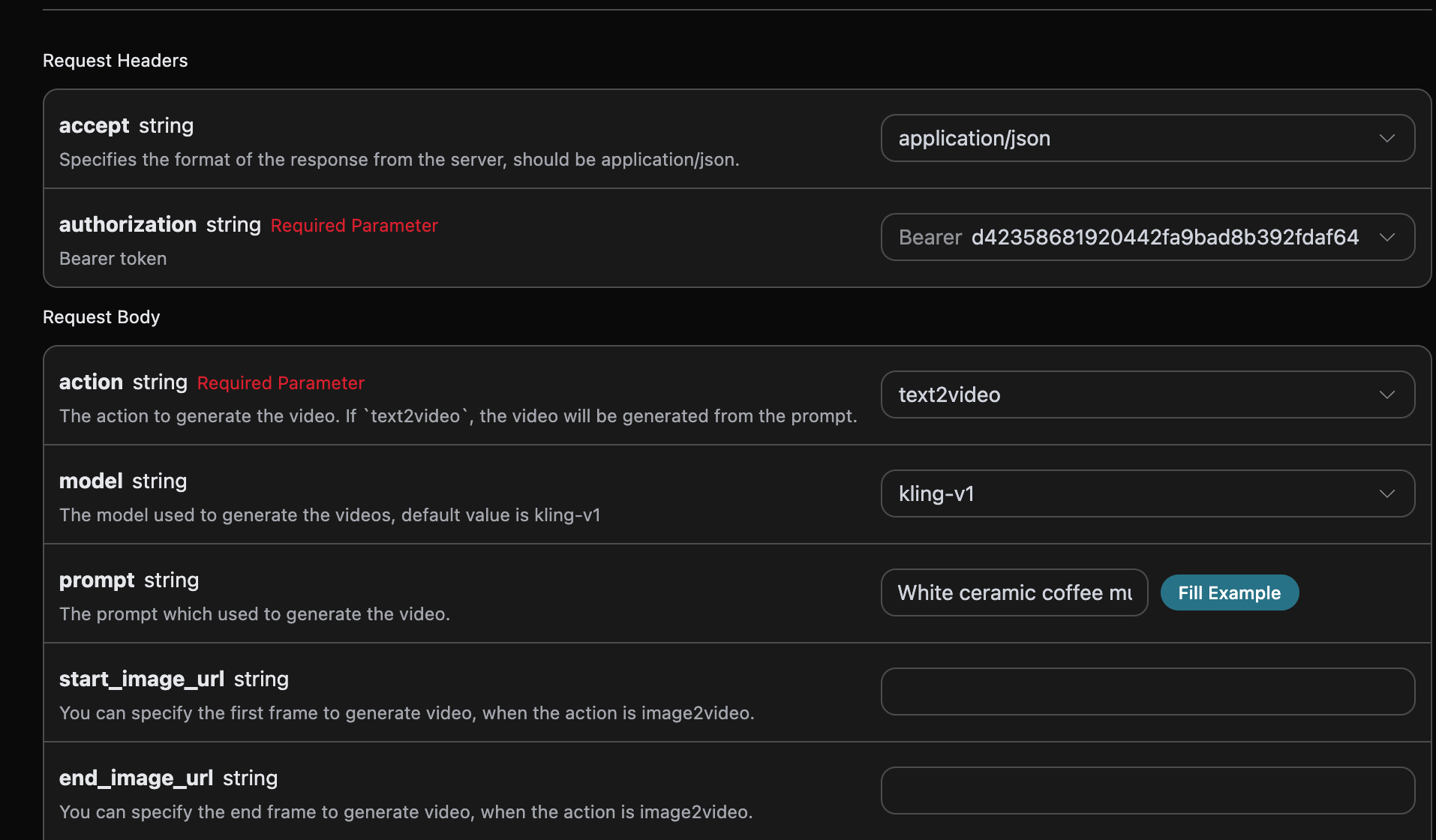
Here, we set the Request Headers, including:
accept: the desired response format, here set toapplication/json(JSON format).authorization: the API key for calling the API, which can be selected from a dropdown after application.
Also, the Request Body includes:
model: the video generation model, mainlykling-v1,kling-v1-6,kling-v2-master,kling-v2-1-master,kling-v2-5-turbo,kling-v2-6,kling-v3,kling-v3-omni,kling-video-o1.mode: the video generation mode, optional values are standard modestd, pro modepro, and native 4K mode4k. The4kmode only supportskling-v3andkling-v3-omniand is incompatible withcamera_control(camera movement control).action: the behavior of this video generation task, mainly three types: text-to-video (text2video), image-to-video (image2video), and extend video (extend).start_image_url: required first frame reference image URL when choosing image-to-video actionimage2video.end_image_url: optional end frame for image-to-video.duration: video length in seconds. Forkling-v3andkling-v3-omni, flexible durations from 3 to 15 seconds (integers) are supported; other models support 5 or 10 seconds.generate_audio: whether to generate audio synchronously, optional boolean. Supported bykling-v3,kling-v3-omni, andkling-v2-6(pro mode only). Default isfalse.aspect_ratio: video aspect ratio, optional, supports16:9,9:16,1:1, default is16:9.cfg_scale: correlation strength, range [0,1], the larger the value, the closer to the prompt.camera_control: optional, parameters controlling camera movement, supports type/simple presets and configurations such as horizontal, vertical, pan, tilt, roll, zoom.negative_prompt: optional, negative prompts to avoid, up to 200 characters.element_list: main subject reference list, only applicable to modelkling-video-o1. Refer to the official documentation for usage details.video_list: reference videos accessed via URL, only applicable to modelkling-video-o1. Refer to the official documentation for usage details.prompt: the prompt.callback_url: URL for callback results.
After selection, the corresponding code is generated on the right side, as shown:
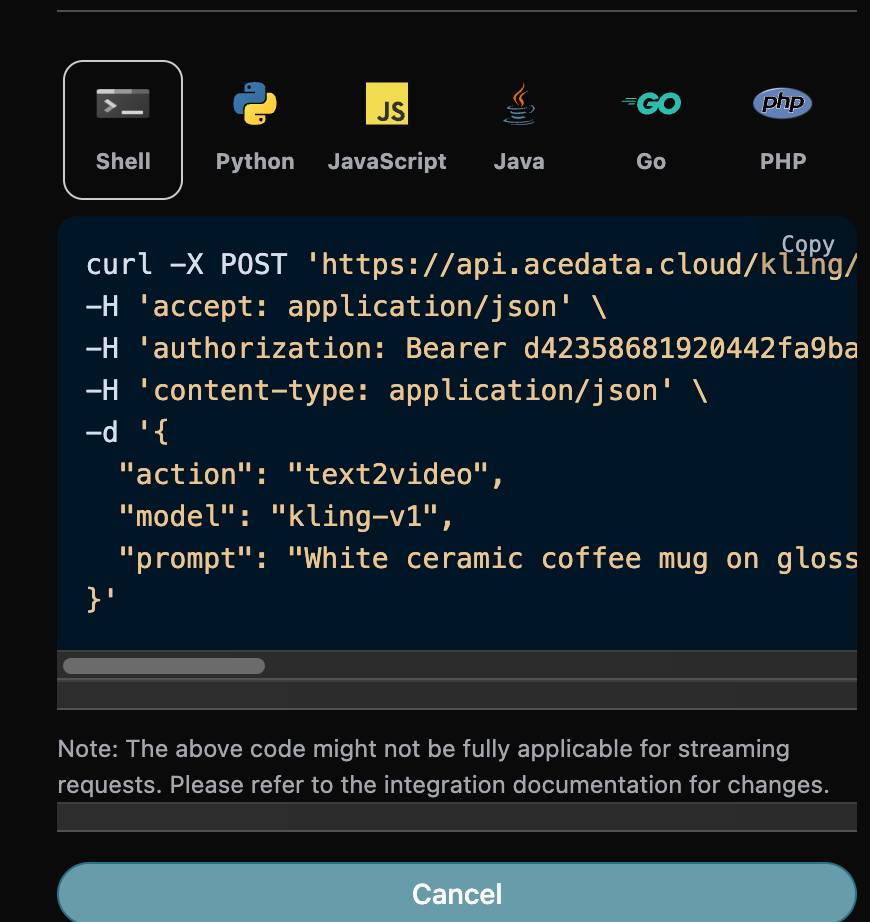
Click the "Try" button to test. As shown above, we get the following result:
{
  "success": true,
  "video_id": "af9a1af0-9aa0-4638-81c1-d41d6143c508",
  "video_url": "https://cdn.klingai.com/bs2/upload-kling-api/7485378259/text2video/Cjil4mfBfs0AAAAAAKbMQQ-0_raw_video_1.mp4",
  "duration": "5.1",
  "state": "succeed",
  "task_id": "e3a575aa-a4bd-49c8-9b12-cde38d5462e0"
}
The response contains multiple fields, described as follows:
success: the status of the video generation task.task_id: the video generation task ID.video_id: the video ID of the generated video.video_url: the video URL of the generated video.duration: the video length.state: the state of the video generation task.
You can see that we have obtained the desired video information. You only need to use the video URL in the data field to access the generated Kling video.
Additionally, if you want to generate the corresponding integration code, you can directly copy the generated code. For example, the CURL code is as follows:
curl -X POST 'https://api.acedata.cloud/kling/videos' \
-H 'accept: application/json' \
-H 'authorization: Bearer {token}' \
-H 'content-type: application/json' \
-d '{
  "action": "text2video",
  "model": "kling-v1",
  "prompt": "White ceramic coffee mug on glossy marble countertop with morning window light. Camera slowly rotates 360 degrees around the mug, pausing briefly at the handle."
}'
¶ Model Capability Matrix
Different models vary significantly in parameter support. The following matrix is compiled from the Kling official video models documentation. Before calling, please verify whether the current model / mode / duration combination supports your required features; otherwise, upstream will return errors like model/mode/duration(...) is not supported with image_tail.
| Model | Mode | end_image_url (start/end frame) |
generate_audio (audio) |
camera_control (camera movement) |
Notes |
|---|---|---|---|---|---|
kling-v1 |
std / pro | ✅ only duration=5 |
❌ | ✅ only duration=5 |
extend does not support negative_prompt and cfg_scale |
kling-v1-6 |
std | ❌ | ❌ | ❌ | Multi-image video and extend full mode available |
kling-v1-6 |
pro | ✅ | ❌ | ❌ | |
kling-v2-master |
— | ❌ | ❌ | ❌ | Single mode, only duration=5/10 |
kling-v2-1-master |
— | ❌ | ❌ | ❌ | Single mode, only duration=5/10 |
kling-v2-5-turbo |
std | ❌ | ❌ | ❌ | |
kling-v2-5-turbo |
pro | ✅ | ❌ | ❌ | |
kling-v2-6 |
std | ❌ | ❌ | ❌ | |
kling-v2-6 |
pro | ✅ | ✅ | ❌ | The only non-v3 model supporting audio |
kling-v3 |
std / pro | ✅ | ✅ | ✅ | duration range 3–15 seconds |
kling-v3 |
4k | ✅ | ✅ | ❌ | 4K mode incompatible with camera movement |
kling-v3-omni |
std / pro / 4k | ✅ | ✅ | ❌ | |
kling-video-o1 |
std / pro | ✅ | ❌ | ❌ | Only supports duration=5/10 |
Notes:
mode=4kis only supported bykling-v3andkling-v3-omni; it is mutually exclusive withcamera_control.end_image_urlcan only be used withstart_image_urlwhenaction=image2video. Passing onlyend_image_url(withoutstart_image_url) will be rejected.kling-v3/kling-v3-omniaccept any integerdurationfrom 3 to 15 seconds; other models only accept 5 or 10 seconds.generate_audiodefaults tofalse. Supported only bykling-v3,kling-v3-omni, andkling-v2-6(pro mode).
¶ Extend Video Feature
If you want to continue generating an already generated Kling video, set the parameter action to extend and input the video ID to continue generating. The video ID is obtained from the basic usage as shown below:

Here, the video ID is:
"video_id": "030bb06d-98d4-4044-9042-0aa0822e8c8c"
Note that the
video_idhere is the ID of the generated video. If you don't know how to generate a video, refer to the basic usage section above.
Next, you must fill in the prompt for the next step to customize the video generation. You can specify the following:
model: video generation model, mainlykling-v1,kling-v1-5, andkling-v1-6.mode: video generation mode, optional values are standard modestd, pro modepro, and native 4K mode4k(only supported bykling-v3andkling-v3-omni, incompatible with camera control).duration: video length for this generation task, mainly 5s and 10s.start_image_url: required first frame reference image URL when choosing image-to-video actionimage2video.prompt: prompt.
Example input:
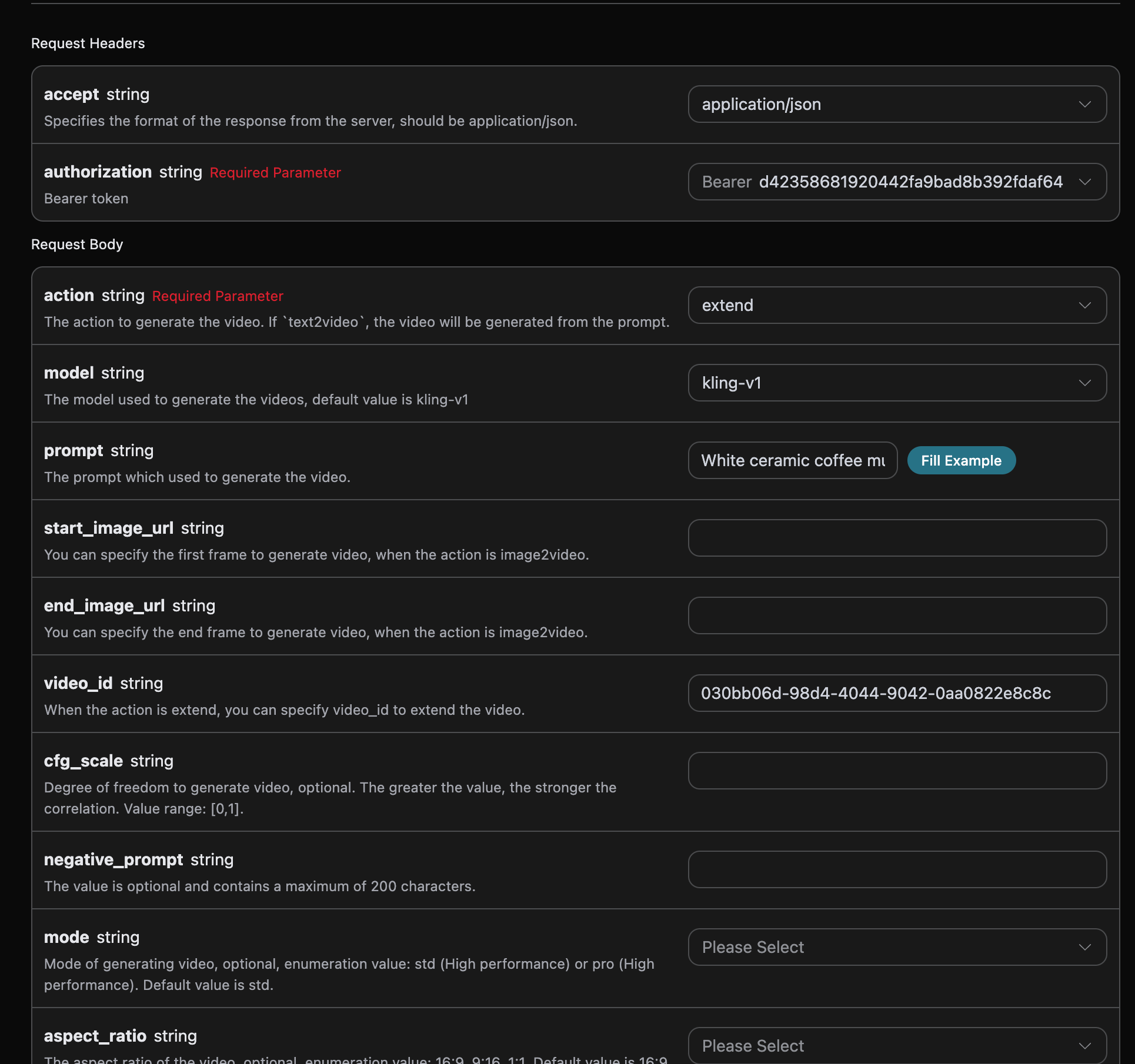
After filling in, the code is automatically generated as follows:
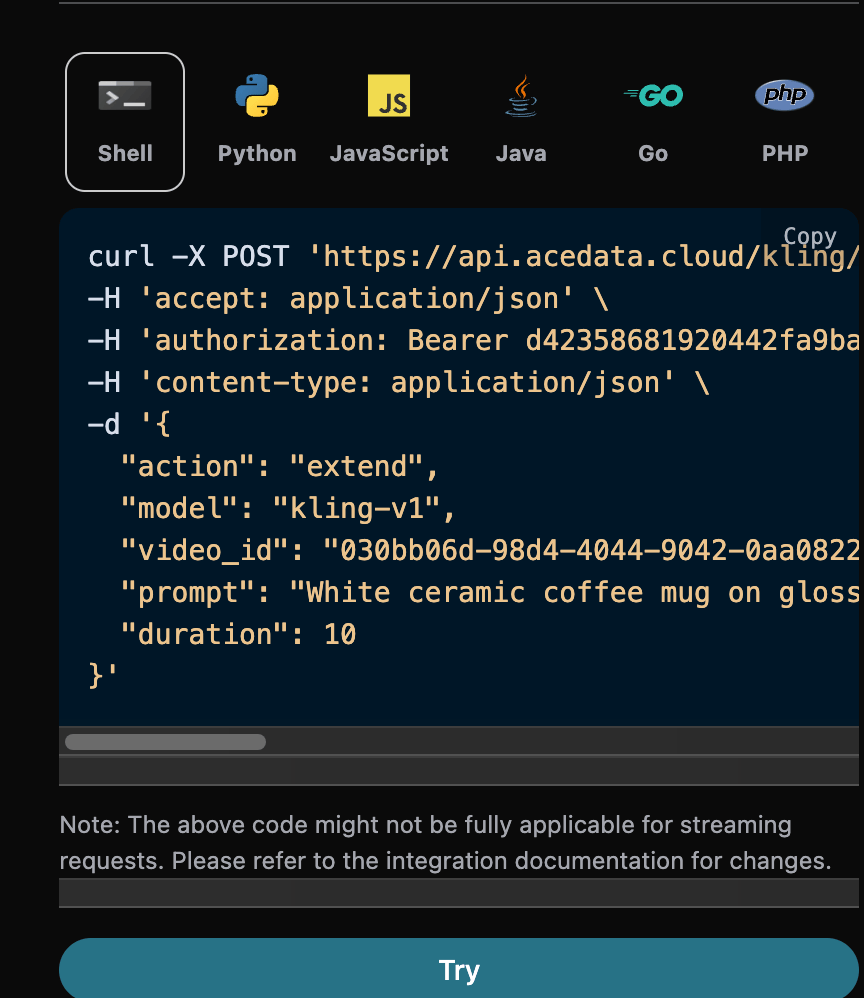
Corresponding Python code:
import requests

url = "https://api.acedata.cloud/kling/videos"

headers = {
    "accept": "application/json",
    "authorization": "Bearer {token}",
    "content-type": "application/json"
}

payload = {
    "action": "extend",
    "model": "kling-v1",
    "video_id": "030bb06d-98d4-4044-9042-0aa0822e8c8c",
    "prompt": "White ceramic coffee mug on glossy marble countertop with morning window light. Camera slowly rotates 360 degrees around the mug, pausing briefly at the handle.",
    "duration": 10
}

response = requests.post(url, json=payload, headers=headers)
print(response.text)
Click run, and you will get a result like this:
{
  "success": true,
  "video_id": "bbc3b105-ac72-4de2-8390-0cb37dc7d41e",
  "video_url": "https://cdn.klingai.com/bs2/upload-kling-api/7822108635/extendVideo/Cjil4mfBfs0AAAAAAKhr6A-0_raw_video_1.mp4",
  "duration": "9.6",
  "state": "succeed",
  "task_id": "3ece87e6-3ee3-4f5e-bd70-5ae5eca89a23"
}
As you can see, the result content is consistent with the previous one, which realizes the extend video feature.
¶ Asynchronous Callback
Since Kling Videos Generation API takes relatively long time to generate videos (about 1-2 minutes), if the API does not respond for a long time, the HTTP request will keep the connection open, causing extra system resource consumption. Therefore, this API also supports asynchronous callbacks.
The overall process is: when the client initiates a request, it additionally specifies a callback_url field. After the client sends the API request, the API immediately returns a result containing a task_id field representing the current task ID. When the task is completed, the generated video result will be sent to the client’s specified callback_url via POST JSON, including the task_id field, so the task result can be correlated by ID.
Let's understand the specific operation through an example.
First, the Webhook callback is a service that can receive HTTP requests. Developers should replace it with their own HTTP server URL. For demonstration, we use a public Webhook sample site https://webhook.site/. Open the site to get a Webhook URL, as shown:

Copy this URL, which can be used as the Webhook. The example URL here is https://webhook.site/624b2c78-6dbd-4618-9d2b-b32eade6d8c3.
Next, set the callback_url field to the above Webhook URL and fill in the corresponding parameters, as shown:
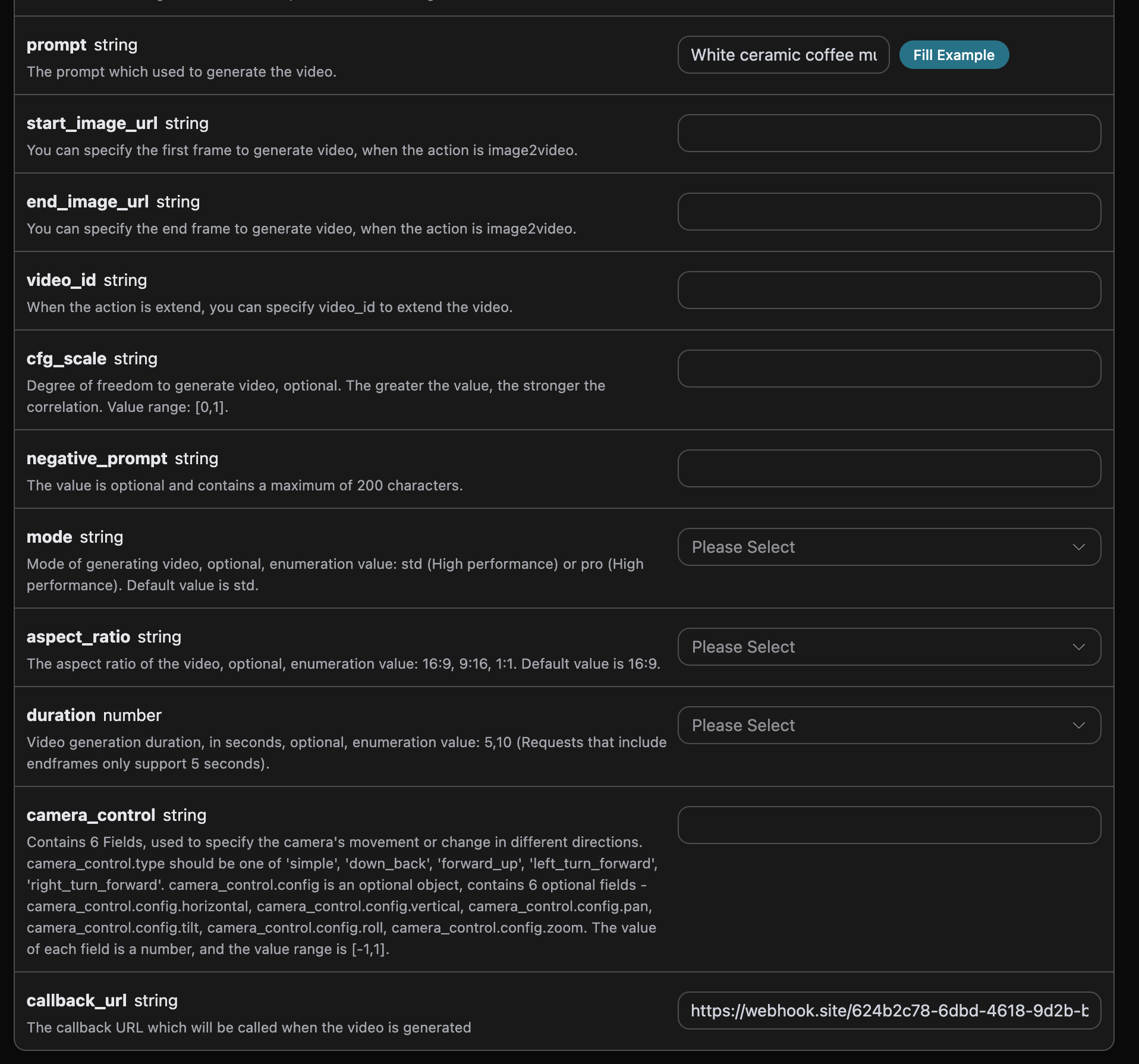
Click run, and you will immediately get a result like this:
{
  "task_id": "20068983-0cc9-4c6a-aeb6-9c6a3c668be0"
}
After a short wait, you can observe the generated video result at https://webhook.site/624b2c78-6dbd-4618-9d2b-b32eade6d8c3, as shown:
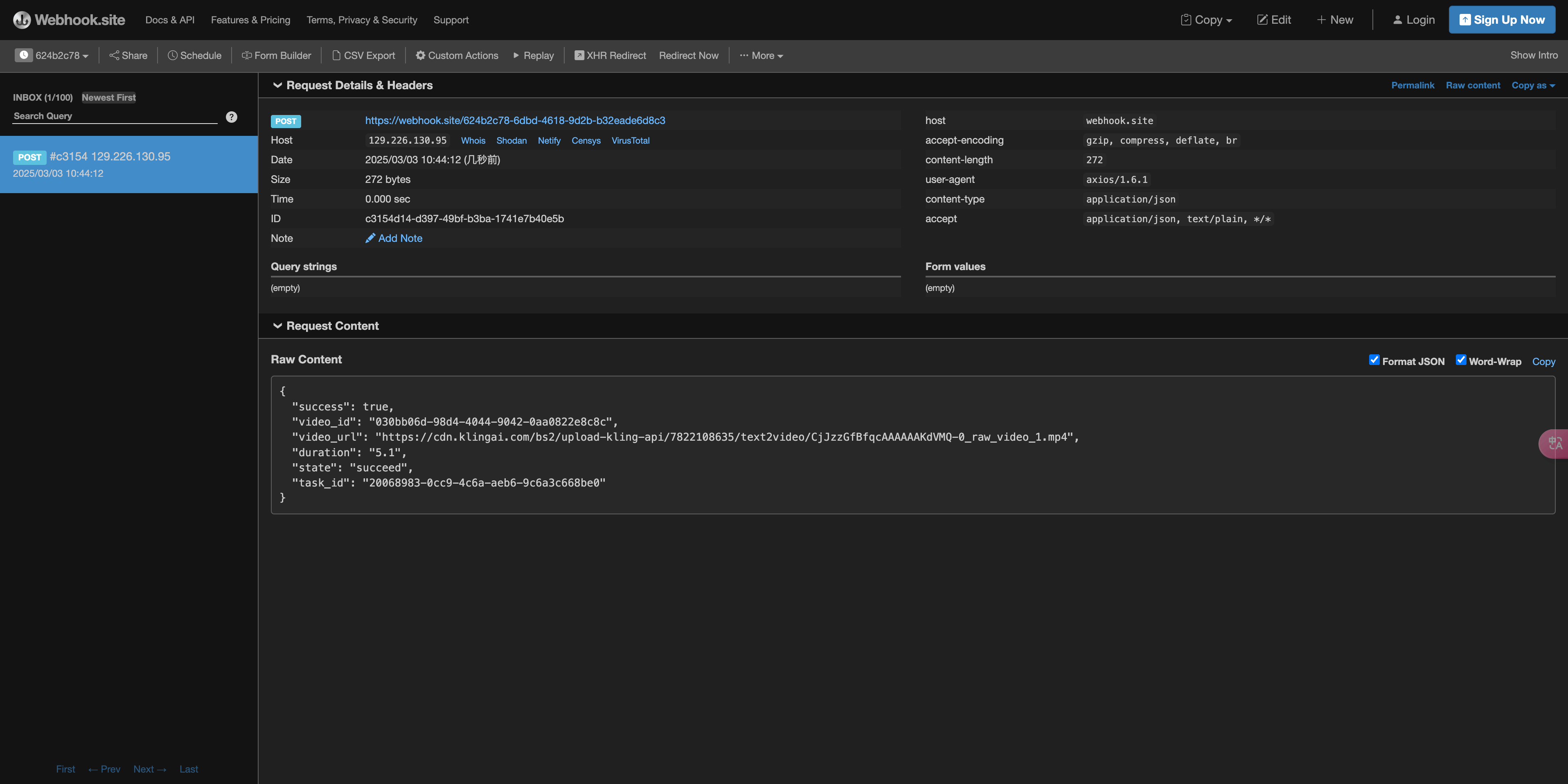
Content as follows:
{
    "success": true,
    "video_id": "030bb06d-98d4-4044-9042-0aa0822e8c8c",
    "video_url": "https://cdn.klingai.com/bs2/upload-kling-api/7822108635/text2video/CjJzzGfBfqcAAAAAAKdVMQ-0_raw_video_1.mp4",
    "duration": "5.1",
    "state": "succeed",
    "task_id": "20068983-0cc9-4c6a-aeb6-9c6a3c668be0"
}
You can see the result contains a task_id field, and other fields are similar to above. This field allows task correlation.
¶ Error Handling
When calling the API, if an error occurs, the API will return the corresponding error code and message. For example:
400 token_mismatched: Bad request, possibly due to missing or invalid parameters.400 api_not_implemented: Bad request, possibly due to missing or invalid parameters.401 invalid_token: Unauthorized, invalid or missing authorization token.429 too_many_requests: Too many requests, rate limit exceeded.500 api_error: Internal server error.
¶ Error Response Example
{
  "success": false,
  "error": {
    "code": "api_error",
    "message": "fetch failed"
  },
  "trace_id": "2cf86e86-22a4-46e1-ac2f-032c0f2a4e89"
}
¶ Conclusion
Through this document, you have learned how to use the Kling Videos Generation API to generate videos by inputting prompts and first frame reference images. We hope this guide helps you better integrate and use the API. If you have any questions, please feel free to contact our technical support team.