
Nano Banana Images API Integration Instructions
This document introduces the integration and usage of the Nano Banana Images API. This interface supports two capabilities: image generation (generate) and image editing (edit).
¶ Application Process
To use Nano Banana Images API, first open the Ace Data Cloud Console and copy your API Token.
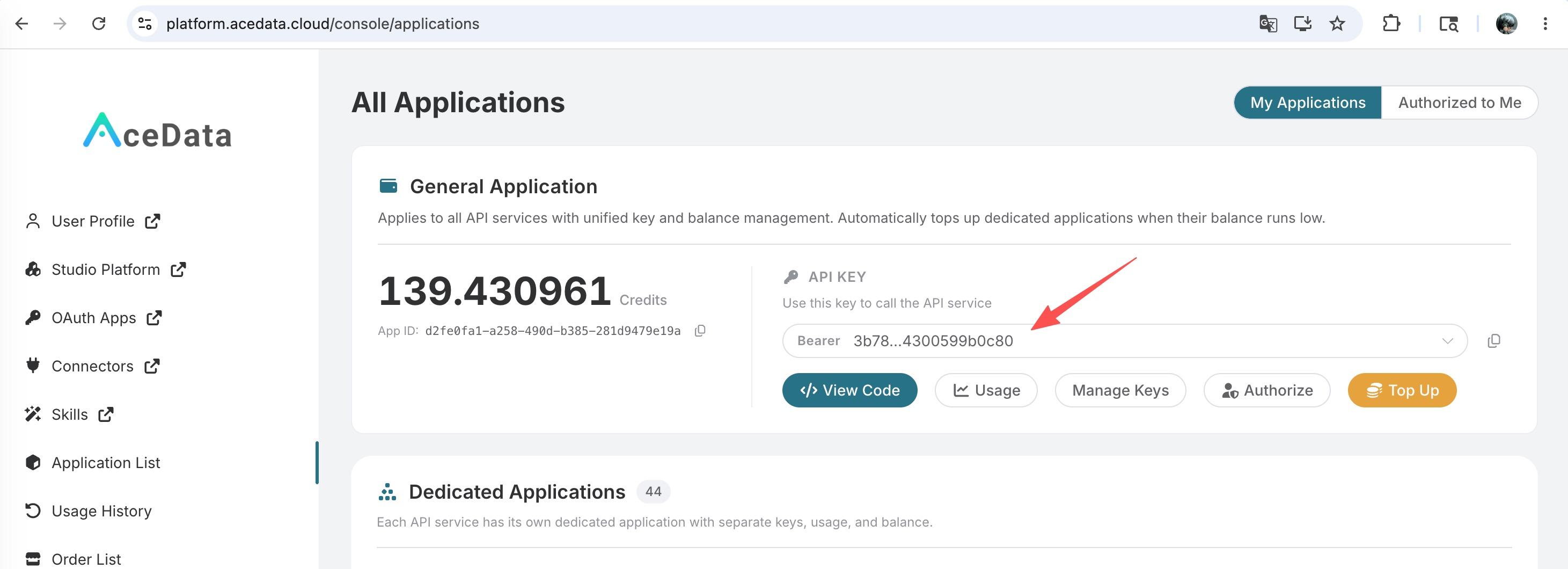
If you are not logged in, you will be redirected to sign in and brought back to this page automatically.
A single API Token works across every service on the platform — no need to subscribe per service. New accounts receive free starter credit; when it runs low you can top up your shared balance in the console.
📘 Full documentation: Nano Banana Images API →
¶ Interface Overview
- Base URL:
https://api.acedata.cloud - Endpoint:
POST /nano-banana/images - Authentication Method: Carry
authorization: Bearer {token}in the HTTP Header - Request Headers:
accept: application/jsoncontent-type: application/json
- Action:
generate: Generate images based on text promptsedit: Edit based on given images
- Model (optional):
nano-banana(default): Based on Gemini 2.5 Flash Image, fast speed, low costnano-banana-2: Based on Gemini 3.1 Flash Image Preview, Pro-level quality + Flash speednano-banana-pro: Based on Gemini 3 Pro Image Preview, highest quality
- Asynchronous Callback: Optional, receive task completion notifications and results via
callback_url
¶ Quick Start: Generate Image (action=generate)
Minimum Required Parameters: action, prompt
When you only want to generate an image based on a prompt, set action to generate and provide a clear prompt.
¶ Request Example (cURL)
curl -X POST 'https://api.acedata.cloud/nano-banana/images' \
  -H 'authorization: Bearer {token}' \
  -H 'accept: application/json' \
  -H 'content-type: application/json' \
  -d '{
    "action": "generate",
    "prompt": "A photorealistic close-up portrait of an elderly Japanese ceramicist with deep, sun-etched wrinkles and a warm, knowing smile. He is carefully inspecting a freshly glazed tea bowl. The setting is his rustic, sun-drenched workshop. The scene is illuminated by soft, golden hour light streaming through a window, highlighting the fine texture of the clay. Captured with an 85mm portrait lens, resulting in a soft, blurred background (bokeh). The overall mood is serene and masterful. Vertical portrait orientation.",
    "count": 1
  }'
¶ Request Example (Python)
import requests

url = "https://api.acedata.cloud/nano-banana/images"
headers = {
    "authorization": "Bearer {token}",
    "accept": "application/json",
    "content-type": "application/json",
}
payload = {
    "action": "generate",
    "prompt": (
        "A photorealistic close-up portrait of an elderly Japanese ceramicist "
        "with deep, sun-etched wrinkles and a warm, knowing smile. He is carefully "
        "inspecting a freshly glazed tea bowl. The setting is his rustic, sun-drenched "
        "workshop. The scene is illuminated by soft, golden hour light streaming through "
        "a window, highlighting the fine texture of the clay. Captured with an 85mm "
        "portrait lens, resulting in a soft, blurred background (bokeh). The overall mood "
        "is serene and masterful. Vertical portrait orientation."
    ),
    "count": 1
}
resp = requests.post(url, json=payload, headers=headers)
print(resp.json())
¶ Successful Response Example
{
  "success": true,
  "task_id": "056f0589-a3dd-4ec2-8440-ad61f5038dfa",
  "trace_id": "c48de83f-0077-426e-b02b-ff1d58179064",
  "data": [
    {
      "prompt": "A photorealistic close-up portrait of an elderly Japanese ceramicist with deep, sun-etched wrinkles and a warm, knowing smile. He is carefully inspecting a freshly glazed tea bowl. The setting is his rustic, sun-drenched workshop. The scene is illuminated by soft, golden hour light streaming through a window, highlighting the fine texture of the clay. Captured with an 85mm portrait lens, resulting in a soft, blurred background (bokeh). The overall mood is serene and masterful. Vertical portrait orientation.",
      "image_url": "https://platform.cdn.acedata.cloud/nanobanana/69790adb-c85d-4362-ad9e-0c9ba4352cf4.png"
    }
  ]
}
¶ Field Explanation
success: Whether the request was successful.task_id: Task ID.trace_id: Trace ID for troubleshooting.data[]: Result list.prompt: The prompt used for generation (echo).image_url: Direct URL of the generated image.
Note: Only
actionandpromptare required to generate an image at/nano-banana/images.
¶ Edit Image (action=edit)
When you want to edit based on an existing image, set action to edit, and pass the list of image URLs to be edited through image_urls (1 or more), while providing a prompt describing the editing goal.
For example, if we provide a photo of a person and a photo of a shirt, we can have the person wear that shirt by passing the image URLs and specifying the action as edit. The URLs can be public accessible links using https or http, or they can be Base64 encoded images, such as data:image/png;base64,iVBORw0KGgoAAAANSUhEUgAAA+gAAAVGCAMAAAA6u2FyAAADAFBMVEXq6uwdHCEeHyMdHS....
¶ Request Example (cURL)
curl -X POST 'https://api.acedata.cloud/nano-banana/images' \
  -H 'authorization: Bearer {token}' \
  -H 'accept: application/json' \
  -H 'content-type: application/json' \
  -d '{
    "action": "edit",
    "prompt": "let this man wear on this T-shirt",
    "image_urls": [
      "https://cdn.acedata.cloud/v8073y.png",
      "https://cdn.acedata.cloud/44xlah.png"
    ],
    "count": 1
  }'
¶ Request Example (Python)
import requests

url = "https://api.acedata.cloud/nano-banana/images"
headers = {
    "authorization": "Bearer {token}",
    "accept": "application/json",
    "content-type": "application/json",
}
payload = {
    "action": "edit",
    "prompt": "let this man wear on this T-shirt",
    "image_urls": [
        "https://cdn.acedata.cloud/v8073y.png",
        "https://cdn.acedata.cloud/44xlah.png"
    ],
    "count": 1
}
resp = requests.post(url, json=payload, headers=headers)
print(resp.json())
¶ Successful Response Example
{
  "success": true,
  "task_id": "93f11baf-347b-4bb4-9520-8653cb46d6a3",
  "trace_id": "a9063166-26ed-4451-85b5-54e896817c69",
  "data": [
    {
      "prompt": "let this man wear on this T-shirt",
      "image_url": "https://platform.cdn.acedata.cloud/nanobanana/8e9e0253-26f4-45b9-b3f8-ac1aed1c284b.png"
    }
  ]
}
¶ Field Explanation
image_urls[]: List of URLs of images to be edited (must be publicly accessible). Multiple images can be passed, and the service will combine these materials with thepromptto complete the editing.- Other fields are the same as the "Generate Image" response.
¶ Asynchronous Callback (Optional, Recommended)
Generating or editing may take some time. To avoid long connections occupying resources, it is recommended to use Webhook Callback via callback_url:
- Add
callback_urlin the request body, for example, your server's Webhook address (must be publicly accessible and support POST JSON). - The API will immediately return a response containing
task_id(or basic results). - When the task is completed, the platform will send the complete JSON to
callback_urlviaPOST. You can associate the request with the result usingtask_id.
Callback Payload Example (field structure is consistent with synchronous success return):
{
  "success": true,
  "task_id": "6a97bf49-df50-4129-9e46-119aa9fca73c",
  "trace_id": "9b4b1ff3-90f2-470f-b082-1061ec2948cc",
  "data": [
    {
      "prompt": "a white siamese cat",
      "image_url": "https://platform.cdn.acedata.cloud/nanobanana/xxxxxxxx-xxxx-xxxx-xxxx-xxxxxxxxxxxx.png"
    }
  ]
}
¶ Error Handling
When a call fails, a standard error format and trace ID will be returned. Common errors are as follows:
- 400
token_mismatched: The request is invalid or parameters are incorrect. - 400
api_not_implemented: The interface is not implemented (please contact support). - 401
invalid_token: Authentication failed or token is missing. - 429
too_many_requests: Request frequency limit exceeded. - 500
api_error: Server exception.
¶ Error Response Example
{
  "success": false,
  "error": {
    "code": "api_error",
    "message": "Internal server error."
  },
  "trace_id": "2cf86e86-22a4-46e1-ac2f-032c0f2a4e89"
}
¶ Parameter Correspondence and Notes
- Required:
action,prompt - Edit Only:
image_urls(array, at least 1 item) - Optional:
model(defaultnano-banana, optionalnano-banana-2ornano-banana-pro),aspect_ratio(width-to-height ratio, such as1:1,16:9),resolution(resolution, such as1K,2K,4K),callback_url(for asynchronous callback) - Headers: Must provide
authorization: Bearer {token};acceptis recommended to be set toapplication/json - Image Accessibility:
image_urlsmust be direct links accessible publicly (HTTP/HTTPS), HTTPS is recommended - Idempotency and Tracking: Retain
task_idandtrace_idfor troubleshooting and result association