
OpenAI Responses API Application and Usage
OpenAI recently provided an interface for creating model responses. It allows for text or image input to generate text or image output. You can have the model call your own custom code or use built-in tools, such as web search or file search, to use your own data as input for the model's response.
This document mainly describes the usage process of the OpenAI Responses API, which allows us to easily utilize the official OpenAI model response creation feature.
¶ Application Process
To use OpenAI Responses API, first open the Ace Data Cloud Console and copy your API Token.
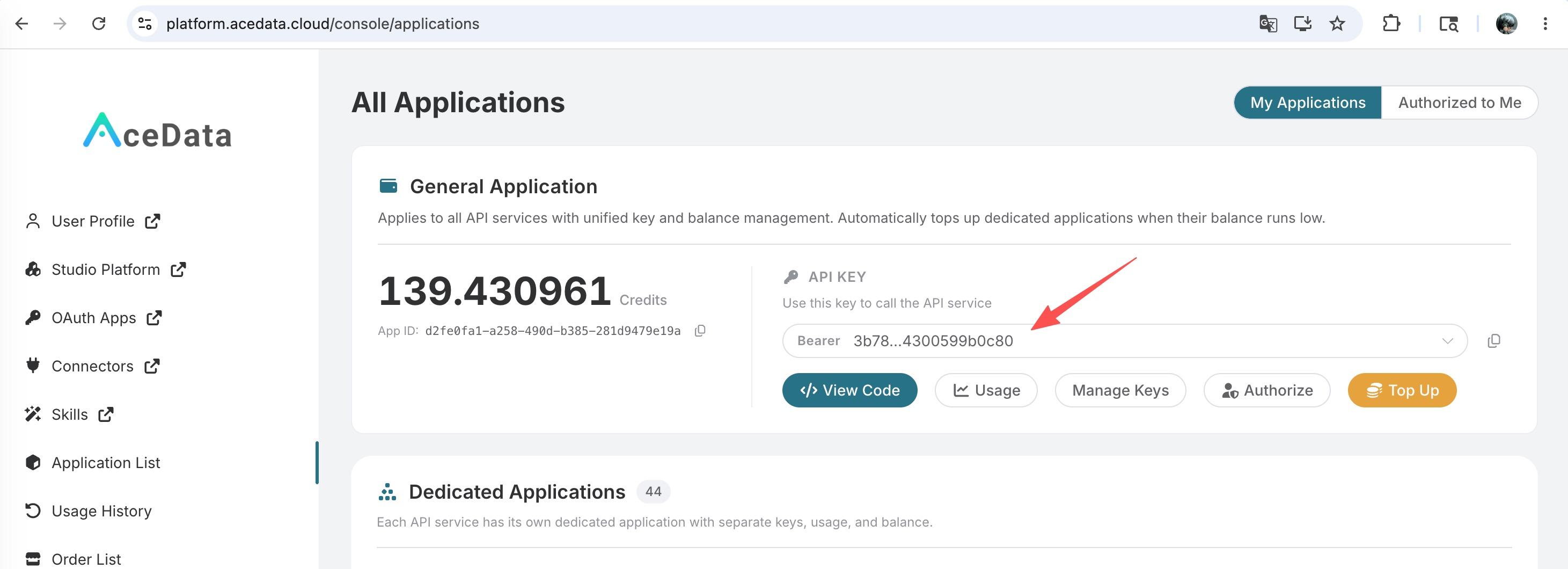
If you are not logged in, you will be redirected to sign in and brought back to this page automatically.
A single API Token works across every service on the platform — no need to subscribe per service. New accounts receive free starter credit; when it runs low you can top up your shared balance in the console.
📘 Full documentation: OpenAI Responses API →
¶ Basic Usage
Next, you can fill in the corresponding content on the interface, as shown in the figure:
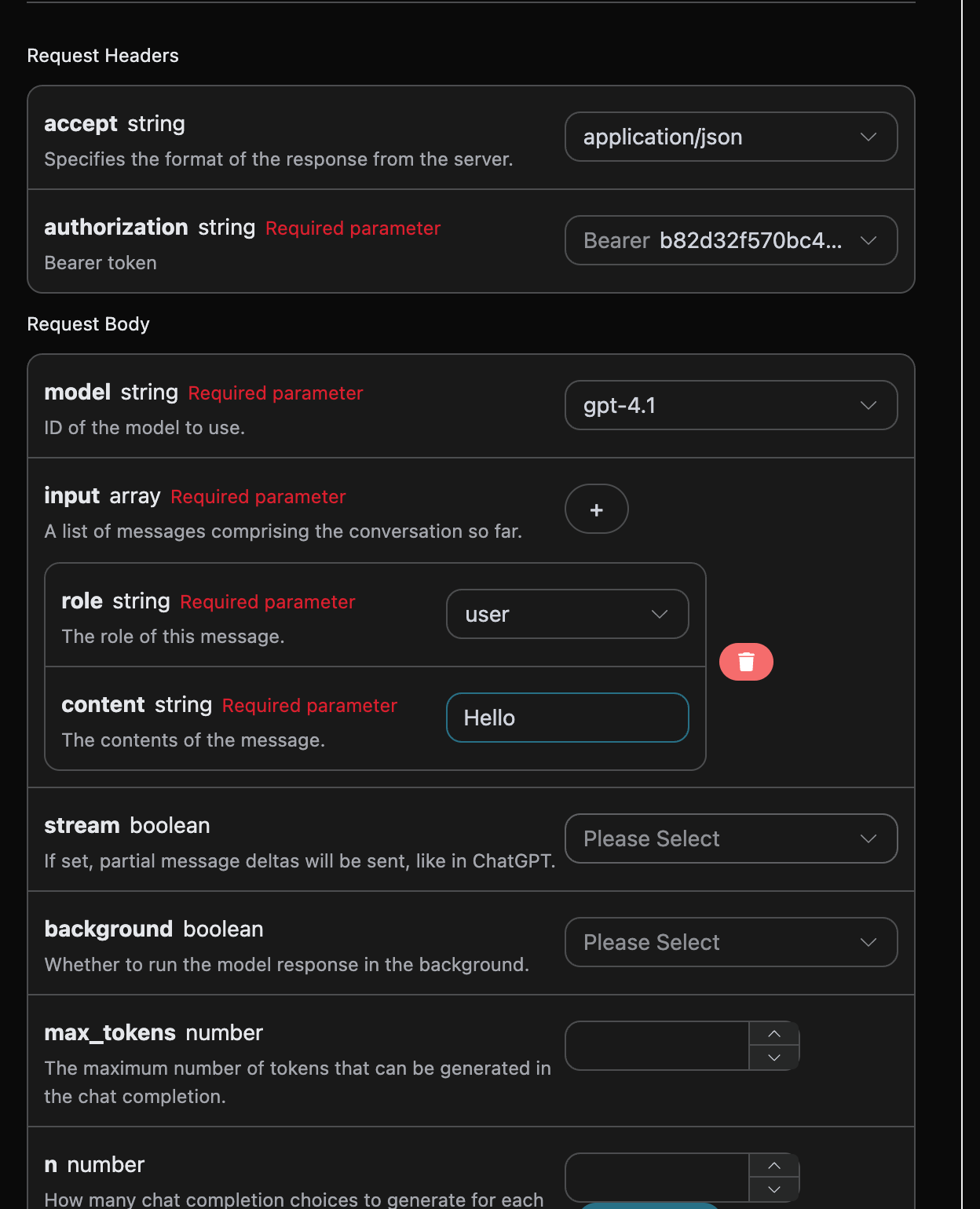
When using this interface for the first time, we need to fill in at least three pieces of information: one is authorization, which can be selected directly from the dropdown list. The other parameter is model, which is the OpenAI ChatGPT model category we choose to use. Here we mainly have 20 types of models; details can be found in the models we provide. The last parameter is input, which is an array of our input questions. It is an array that allows multiple questions to be uploaded simultaneously, with each question containing role and content. The role indicates the role of the questioner, and we provide three identities: user, assistant, and system. The other content is the specific content of our question.
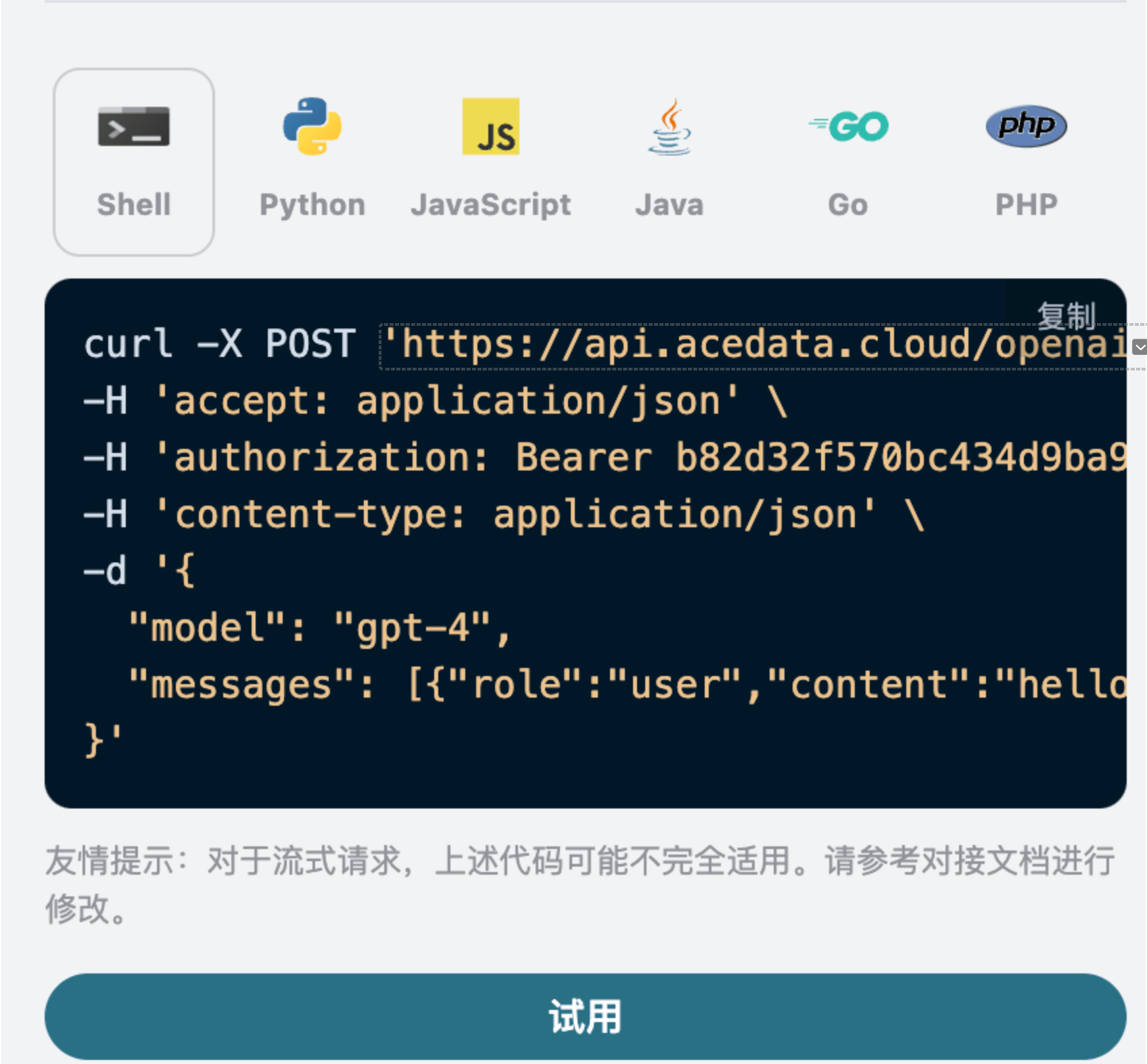
You can also notice that there is corresponding code generation on the right side; you can copy the code to run directly or click the "Try" button for testing.
Common optional parameters:
max_tokens: Limits the maximum number of tokens for a single response.temperature: Generates randomness, between 0-2, with larger values being more divergent.n: How many candidate responses to generate at once.response_format: Sets the return format.tools: Function/tool call definitions.background: Whether to run asynchronously in the background.
After the call, we find the returned result as follows:
{
  "id": "resp_68a98322e3c88191a027de2711a02a490554cad0b36c0400",
  "object": "response",
  "created_at": 1755939618,
  "status": "completed",
  "background": false,
  "content_filters": null,
  "error": null,
  "incomplete_details": null,
  "instructions": null,
  "max_output_tokens": null,
  "max_tool_calls": null,
  "model": "gpt-4.1",
  "output": [
    {
      "id": "msg_68a98323422c8191a7f383eea48ba5160554cad0b36c0400",
      "type": "message",
      "status": "completed",
      "content": [
        {
          "type": "output_text",
          "annotations": [],
          "text": "Hello! How can I assist you today?"
        }
      ],
      "role": "assistant"
    }
  ],
  "parallel_tool_calls": true,
  "previous_response_id": null,
  "prompt_cache_key": null,
  "reasoning": {
    "effort": null,
    "summary": null
  },
  "safety_identifier": null,
  "service_tier": "default",
  "store": true,
  "temperature": 1,
  "text": {
    "format": {
      "type": "text"
    }
  },
  "tool_choice": "auto",
  "tools": [],
  "top_p": 1,
  "truncation": "disabled",
  "usage": {
    "input_tokens": 8,
    "input_tokens_details": {
      "cached_tokens": 0
    },
    "output_tokens": 10,
    "output_tokens_details": {
      "reasoning_tokens": 0
    },
    "total_tokens": 18
  },
  "user": null,
  "metadata": {}
}
The returned result contains multiple fields, described as follows:
id: The ID generated for this dialogue task, used to uniquely identify this dialogue task.model: The selected OpenAI ChatGPT model.output: The response information provided by ChatGPT for the input question.usage: Token statistics for this Q&A.
Among them, output contains the response information from ChatGPT, and the output inside it is from ChatGPT, as shown in the figure.
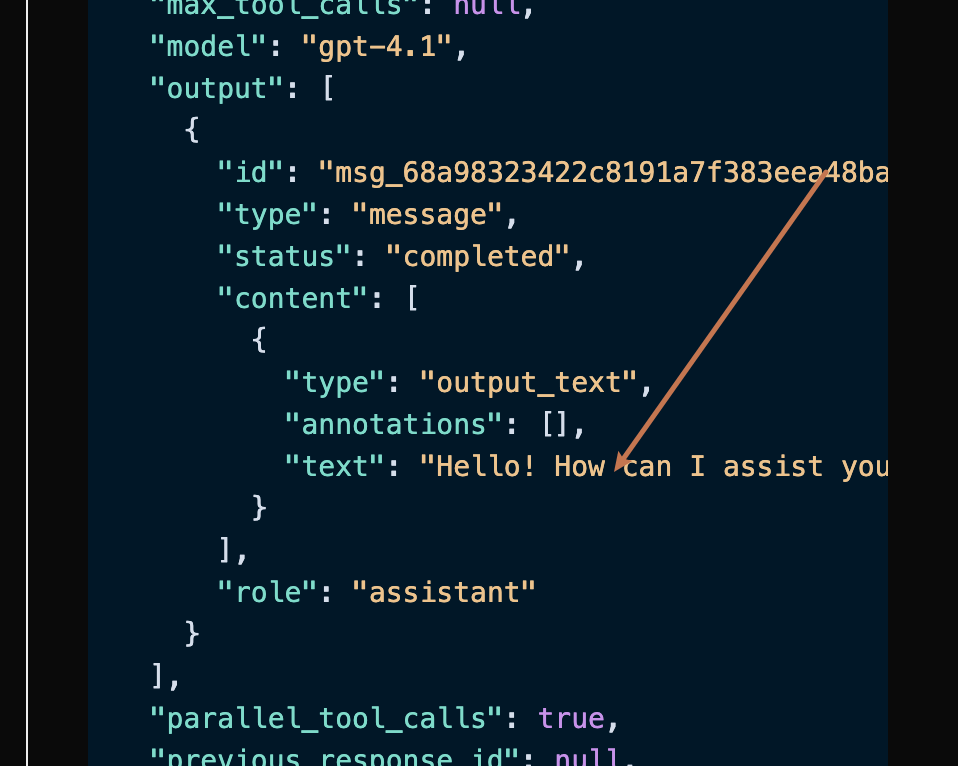
You can see that the content field in output contains the specific content of ChatGPT's reply.
¶ Streaming Response
This interface also supports streaming responses, which is very useful for web integration, allowing the webpage to display results word by word.
If you want to return responses in a streaming manner, you can change the stream parameter in the request header to true.
Modify as shown in the figure, but the calling code needs to have corresponding changes to support streaming responses.
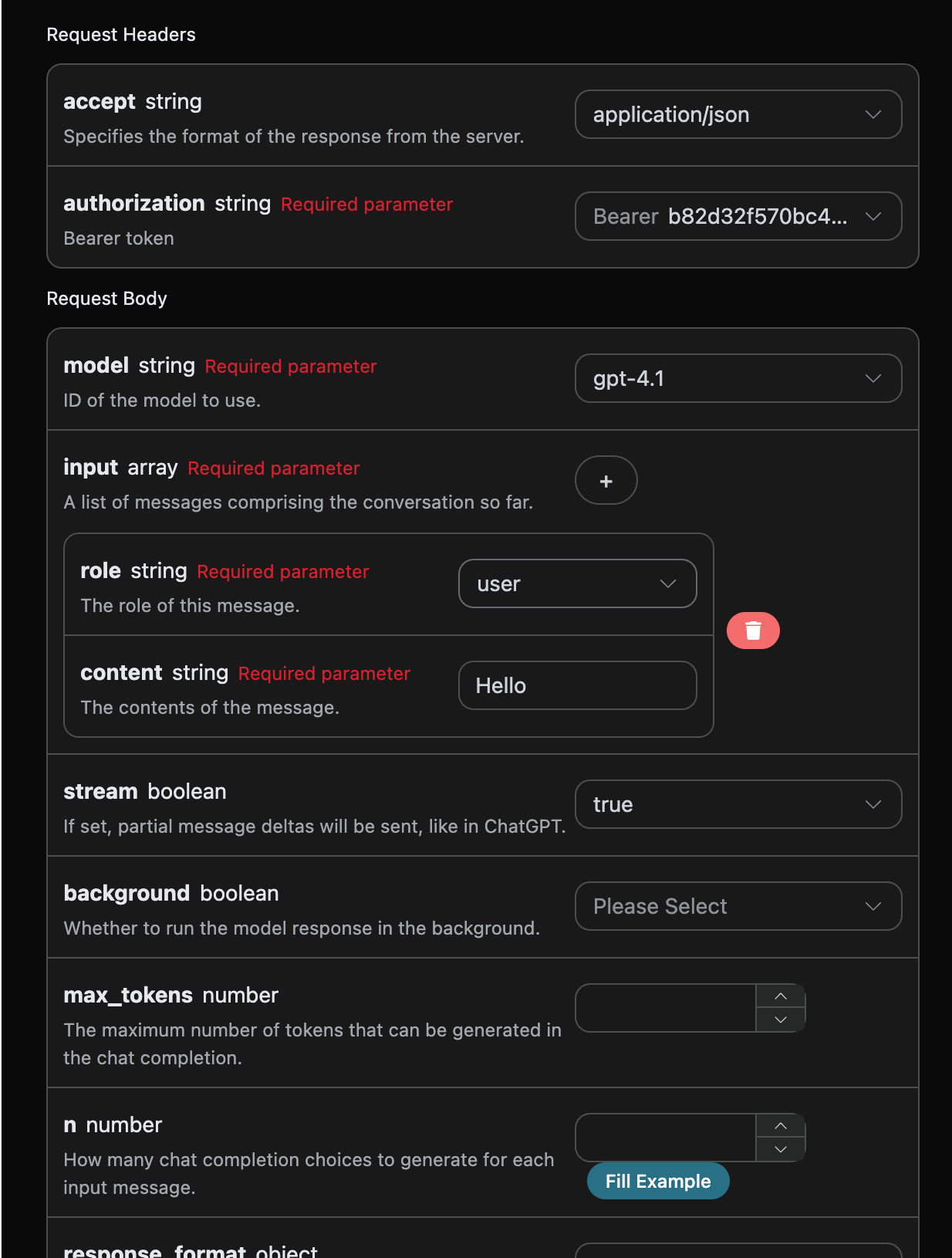
After changing stream to true, the API will return the corresponding JSON data line by line, and we need to make corresponding modifications in the code to obtain the line-by-line results.
Python sample calling code:
import requests

url = "https://api.acedata.cloud/openai/responses"

headers = {
    "accept": "application/json",
    "authorization": "Bearer {token}",
    "content-type": "application/json"
}

payload = {
    "model": "gpt-4.1",
    "input": [{"role":"user","content":"Hello"}],
    "stream": True
}

response = requests.post(url, json=payload, headers=headers)
print(response.text)
The output effect is as follows:
data: {"type": "response.created", "sequence_number": 0, "response": {"id": "resp_68a9837bb9bc8190b403947311db6faa0721186e8fbb89d0", "object": "response", "created_at": 1755939707, "status": "in_progress", "background": false, "content_filters": null, "error": null, "incomplete_details": null, "instructions": null, "max_output_tokens": null, "max_tool_calls": null, "model": "gpt-4.1-data", "output": [], "parallel_tool_calls": true, "previous_response_id": null, "prompt_cache_key": null, "reasoning": {"effort": null, "summary": null}, "safety_identifier": null, "service_tier": "auto", "store": true, "temperature": 1.0, "text": {"format": {"type": "text"}}, "tool_choice": "auto", "tools": [], "top_p": 1.0, "truncation": "disabled", "usage": null, "user": null, "metadata": {}}, "model": "gpt-4.1"}

data: {"type": "response.in_progress", "sequence_number": 1, "response":
{"id": "resp_68a9837bb9bc8190b403947311db6faa0721186e8fbb89d0", "object": "response", "created_at": 1755939707, "status": "in_progress", "background": false, "content_filters": null, "error": null, "incomplete_details": null, "instructions": null, "max_output_tokens": null, "max_tool_calls": null, "model": "gpt-4.1-data", "output": [], "parallel_tool_calls": true, "previous_response_id": null, "prompt_cache_key": null, "reasoning": {"effort": null, "summary": null}, "safety_identifier": null, "service_tier": "auto", "store": true, "temperature": 1.0, "text": {"format": {"type": "text"}}, "tool_choice": "auto", "tools": [], "top_p": 1.0, "truncation": "disabled", "usage": null, "user": null, "metadata": {}}, "model": "gpt-4.1"}
data: {"type": "response.output_item.added", "sequence_number": 2, "output_index": 0, "item": {"id": "msg_68a9837c49f081908f568bf9c6065c620721186e8fbb89d0", "type": "message", "status": "in_progress", "content": [], "role": "assistant"}, "model": "gpt-4.1"}
data: {"type": "response.content_part.added", "sequence_number": 3, "item_id": "msg_68a9837c49f081908f568bf9c6065c620721186e8fbb89d0", "output_index": 0, "content_index": 0, "part": {"type": "output_text", "annotations": [], "text": ""}, "model": "gpt-4.1"}
data: {"type": "response.output_text.delta", "sequence_number": 4, "item_id": "msg_68a9837c49f081908f568bf9c6065c620721186e8fbb89d0", "output_index": 0, "content_index": 0, "delta": "Hello", "model": "gpt-4.1"}
data: {"type": "response.output_text.delta", "sequence_number": 5, "item_id": "msg_68a9837c49f081908f568bf9c6065c620721186e8fbb89d0", "output_index": 0, "content_index": 0, "delta": "!", "model": "gpt-4.1"}
data: {"type": "response.output_text.delta", "sequence_number": 6, "item_id": "msg_68a9837c49f081908f568bf9c6065c620721186e8fbb89d0", "output_index": 0, "content_index": 0, "delta": " How", "model": "gpt-4.1"}
data: {"type": "response.output_text.delta", "sequence_number": 7, "item_id": "msg_68a9837c49f081908f568bf9c6065c620721186e8fbb89d0", "output_index": 0, "content_index": 0, "delta": " can", "model": "gpt-4.1"}
data: {"type": "response.output_text.delta", "sequence_number": 8, "item_id": "msg_68a9837c49f081908f568bf9c6065c620721186e8fbb89d0", "output_index": 0, "content_index": 0, "delta": " I", "model": "gpt-4.1"}
data: {"type": "response.output_text.delta", "sequence_number": 9, "item_id": "msg_68a9837c49f081908f568bf9c6065c620721186e8fbb89d0", "output_index": 0, "content_index": 0, "delta": " help", "model": "gpt-4.1"}
data: {"type": "response.output_text.delta", "sequence_number": 10, "item_id": "msg_68a9837c49f081908f568bf9c6065c620721186e8fbb89d0", "output_index": 0, "content_index": 0, "delta": " you", "model": "gpt-4.1"}
data: {"type": "response.output_text.delta", "sequence_number": 11, "item_id": "msg_68a9837c49f081908f568bf9c6065c620721186e8fbb89d0", "output_index": 0, "content_index": 0, "delta": " today", "model": "gpt-4.1"}
data: {"type": "response.output_text.delta", "sequence_number": 12, "item_id": "msg_68a9837c49f081908f568bf9c6065c620721186e8fbb89d0", "output_index": 0, "content_index": 0, "delta": "?", "model": "gpt-4.1"}
data: {"type": "response.output_text.delta", "sequence_number": 13, "item_id": "msg_68a9837c49f081908f568bf9c6065c620721186e8fbb89d0", "output_index": 0, "content_index": 0, "delta": " 😊", "model": "gpt-4.1"}
data: {"type": "response.output_text.done", "sequence_number": 14, "item_id": "msg_68a9837c49f081908f568bf9c6065c620721186e8fbb89d0", "output_index": 0, "content_index": 0, "text": "Hello! How can I help you today? 😊", "model": "gpt-4.1"}
data: {"type": "response.content_part.done", "sequence_number": 15, "item_id": "msg_68a9837c49f081908f568bf9c6065c620721186e8fbb89d0", "output_index": 0, "content_index": 0, "part": {"type": "output_text", "annotations": [], "text": "Hello! How can I help you today? 😊"}, "model": "gpt-4.1"}
data: {"type": "response.output_item.done", "sequence_number": 16, "output_index": 0, "item": {"id": "msg_68a9837c49f081908f568bf9c6065c620721186e8fbb89d0", "type": "message", "status": "completed", "content": [{"type": "output_text", "annotations": [], "text": "Hello! How can I help you today? 😊"}], "role": "assistant"}, "model": "gpt-4.1"}
data: {"type": "response.completed", "sequence_number": 17, "response": {"id": "resp_68a9837bb9bc8190b403947311db6faa0721186e8fbb89d0", "object": "response", "created_at": 1755939707, "status": "completed", "background": false, "content_filters": null, "error": null, "incomplete_details": null, "instructions": null, "max_output_tokens": null, "max_tool_calls": null, "model": "gpt-4.1-data", "output": [{"id": "msg_68a9837c49f081908f568bf9c6065c620721186e8fbb89d0", "type": "message", "status": "completed", "content": [{"type": "output_text", "annotations": [], "text": "Hello! How can I help you today? 😊"}], "role": "assistant"}], "parallel_tool_calls": true, "previous_response_id": null, "prompt_cache_key": null, "reasoning": {"effort": null, "summary": null}, "safety_identifier": null, "service_tier": "default", "store": true, "temperature": 1.0, "text": {"format": {"type": "text"}}, "tool_choice": "auto", "tools": [], "top_p": 1.0, "truncation": "disabled", "usage":
import requests

url = "https://api.acedata.cloud/openai/responses"

headers = {
    "accept": "application/json",
    "authorization": "Bearer {token}",
    "content-type": "application/json"
}

payload = {
    "model": "gpt-4.1",
    "input": [
        {
            "role": "user",
            "content": [
                {"type": "input_text", "text": "what is in this image?"},
                {
                    "type": "input_image",
                    "image_url": "https://upload.wikimedia.org/wikipedia/commons/thumb/d/dd/Gfp-wisconsin-madison-the-nature-boardwalk.jpg/2560px-Gfp-wisconsin-madison-the-nature-boardwalk.jpg"
                }
            ]
        }
    ]
}

response = requests.post(url, json=payload, headers=headers)
print(response.text)
import requests

url = "https://api.acedata.cloud/openai/chat/completions"

headers = {
    "accept": "application/json",
    "authorization": "Bearer {token}",
    "content-type": "application/json"
}

payload = {
    "model": "gpt-4.1",
    "input": [
      {
        "role": "user",
        "content": [
          {"type": "input_text", "text": "what is in this image?"},
          {
            "type": "input_image",
            "image_url": "https://upload.wikimedia.org/wikipedia/commons/thumb/d/dd/Gfp-wisconsin-madison-the-nature-boardwalk.jpg/2560px-Gfp-wisconsin-madison-the-nature-boardwalk.jpg"
          }
        ]
      }
    ]
  }

response = requests.post(url, json=payload, headers=headers)
print(response.text)
Then you can get the following result, where the field information is consistent with the above text, specifically as follows:
{
  "id": "resp_68a98c1bb784819e9b9f622007a2d37602483949012d2193",
  "object": "response",
  "created_at": 1755941915,
  "status": "completed",
  "background": false,
  "content_filters": null,
  "error": null,
  "incomplete_details": null,
  "instructions": null,
  "max_output_tokens": null,
  "max_tool_calls": null,
  "model": "gpt-4.1",
  "output": [
    {
      "id": "msg_68a98c1dd030819e97fb71e6ee33f5a902483949012d2193",
      "type": "message",
      "status": "completed",
      "content": [
        {
          "type": "output_text",
          "annotations": [],
          "text": "This image shows a scenic path, possibly a boardwalk, running through a lush green field or meadow. The sky above is bright blue with some white clouds, and there are green trees and bushes in the background. It looks like a peaceful nature scene, possibly in a park, wetland, or prairie area. The image conveys a sense of tranquility and natural beauty."
        }
      ],
      "role": "assistant"
    }
  ],
  "parallel_tool_calls": true,
  "previous_response_id": null,
  "prompt_cache_key": null,
  "reasoning": {
    "effort": null,
    "summary": null
  },
  "safety_identifier": null,
  "service_tier": "default",
  "store": true,
  "temperature": 1,
  "text": {
    "format": {
      "type": "text"
    }
  },
  "tool_choice": "auto",
  "tools": [],
  "top_p": 1,
  "truncation": "disabled",
  "usage": {
    "input_tokens": 1118,
    "input_tokens_details": {
      "cached_tokens": 0
    },
    "output_tokens": 75,
    "output_tokens_details": {
      "reasoning_tokens": 0
    },
    "total_tokens": 1193
  },
  "user": null,
  "metadata": {}
}
It can be seen that the content of the response is based on the image, so through the above two methods, the text and image processing capabilities of the gpt-4.1 model can be easily utilized.
In addition to gpt-4.1, there is a lower-cost model called gpt-4o-mini. gpt-4o-mini is the latest generation of large language models developed by OpenAI, which not only responds quickly but is also cheaper and supports multimodal capabilities. The use of vision features can refer to the content of the gpt-4.1 model mentioned above.
¶ Creation of File Processing Model
Request example:
{
  "model": "gpt-4.1",
  "input": [
    {
      "role": "user",
      "content": [
        { "type": "input_text", "text": "what is in this file?" },
        {
          "type": "input_file",
          "file_url": "https://www.berkshirehathaway.com/letters/2024ltr.pdf"
        }
      ]
    }
  ]
}
Example result:
{
  "id": "resp_68a98d7bb57c819ba25424f5f50a29a300a1af2af822e88a",
  "object": "response",
  "created_at": 1755942267,
  "status": "completed",
  "background": false,
  "content_filters": null,
  "error": null,
  "incomplete_details": null,
  "instructions": null,
  "max_output_tokens": null,
  "max_tool_calls": null,
  "model": "gpt-4.1",
  "output": [
    {
      "id": "msg_68a98d7d9b80819b9b0f09b7bcd00bf900a1af2af822e88a",
      "type": "message",
      "status": "completed",
      "content": [
        {
          "type": "output_text",
          "annotations": [],
          "text": "The file you posted contains the **2024 annual letter to shareholders from Berkshire Hathaway Inc.**, written by Warren E. Buffett, Chairman of the Board. This document is a comprehensive communication that is typically included in Berkshire's annual report to shareholders.\n\n### What's Inside the File:\n\n#### 1. **Chairman's Letter to Shareholders**\n   - **Introduction & Philosophy:** Warren Buffett discusses the purpose of the annual report, Berkshire Hathaway’s communication style, and his philosophy for transparency and candid discussion of both successes and failures.\n   - **Discussion of Mistakes:** He talks openly about the mistakes made in capital allocation and personnel decisions, emphasizing the importance of admitting errors and acting promptly to correct them.\n   - **Succession Comments:** Buffett references his eventual retirement, and that Greg Abel will succeed him as CEO and writer of these letters.\n   - **Anecdotal Story:** The story of Pete Liegl, founder of Forest River (an RV manufacturer acquired by Berkshire), is told to illustrate management philosophy and business decision-making.\n\n#### 2. **2024 Business and Financial Performance**\n   - **Key Results:** Summary of how Berkshire performed financially in 2024 vs. 2023, including operating earnings breakdown by business segments such as insurance, BNSF railroad, and energy.\n   - **Insurance Business:** GEICO and the property-casualty insurance division had a standout year, with commentary on the industry and how Berkshire approaches insurance risk, pricing, and investment of insurance \"float.\"\n   - **Investments:** Discussion on Berkshire’s strategy of owning both full businesses and partial stakes (marketable securities) in large companies (e.g., Apple, American Express, Coca-Cola), and its deployment of cash.\n   - **Taxes:** Reference to Berkshire breaking records in corporate tax payments ($26.8 billion to the IRS in 2024).\n\n#### 3. **Long-term Philosophy & Capitalism Commentary**\n   - **On Equities:** Buffett explains why Berkshire prioritizes ownership of businesses (equities) over cash or bonds, and why the company favors long-term investments.\n   - **On Capitalism:** There’s a reflection on America’s growth, the role of capitalism, savings, and capital allocation in the nation’s success, and a nod to the importance of maintaining a stable currency.\n\n#### 4. **Japanese Investments**\n   - **Update on Japanese Holdings:** Berkshire’s growing investments in five Japanese trading companies, and the positive view of their management and governance.\n\n#### 5. **Berkshire Hathaway Annual Meeting**\n   - **Annual Gathering Info:** Details about the annual meeting in Omaha, including social events, book sales, and charitable initiatives related to the meeting.\n   - **Personal Stories:** Personal anecdotes involving Buffett’s family, (including his sister Bertie), to add a human touch to the letter.\n\n#### 6. **Performance Tables**\n   - **Berkshire vs S&P 500 (1965-2024):** Two detailed tables showing annual percentage change in Berkshire’s share price vs. total return for the S&P 500, as well as long-term compounded and overall gains.\n\n---\n\n### In Summary\n\nThis file is the **2024 Berkshire Hathaway annual letter to shareholders**, primarily written by Warren Buffett. It covers business performance, management philosophy, investment strategy, earnings and taxes, insurance operations, significant holdings, capital allocation, succession updates, and more. Tables show a remarkable outperformance of Berkshire Hathaway vs. the S&P 500 over nearly six decades – a central point of pride in the letter.\n\nIf you want specifics from any particular section, let me know!"
        }
      ],
      "role": "assistant"
    }
  ],
  "parallel_tool_calls": true,
  "previous_response_id": null,
  "prompt_cache_key": null,
  "reasoning": {
    "effort": null,
    "summary": null
  },
  "safety_identifier": null,
  "service_tier": "default",
  "store": true,
  "temperature": 1,
  "text": {
    "format": {
      "type": "text"
    }
  },
  "tool_choice": "auto",
  "tools": [],
  "top_p": 1,
  "truncation": "disabled",
  "usage": {
    "input_tokens": 8438,
    "input_tokens_details": {
      "cached_tokens": 0
    },
    "output_tokens": 731,
    "output_tokens_details": {
      "reasoning_tokens": 0
    },
    "total_tokens": 9169
  },
  "user": null,
  "metadata": {}
}
You can see that we have also processed the input file, and the result is similar to the above text.
¶ Error Handling
When calling the API, if an error occurs, the API will return the corresponding error code and message. For example:
400 token_mismatched: Bad request, possibly due to missing or invalid parameters.400 api_not_implemented: Bad request, possibly due to missing or invalid parameters.401 invalid_token: Unauthorized, invalid or missing authorization token.429 too_many_requests: Too many requests, you have exceeded the rate limit.500 api_error: Internal server error, something went wrong on the server.
¶ Error Response Example
{
  "success": false,
  "error": {
    "code": "api_error",
    "message": "fetch failed"
  },
  "trace_id": "2cf86e86-22a4-46e1-ac2f-032c0f2a4e89"
}
¶ Conclusion
Through this document, you have learned how to easily implement the official OpenAI's creation of Responses feature using the OpenAI Responses API. We hope this document helps you better integrate and use the API. If you have any questions, please feel free to contact our technical support team.